
How to create an icon in Program Manager
Updated: 06/30/2020 by Computer Hope

To create an icon in the Program Manager of Windows 3.x or Windows NT 3.x, follow these steps.
Create an icon in Program Manager
Within Program Manager, select the group you want the icon to be in, such as Main (when selected, the top bar turns blue). Once the group is selected, click File, New, and select Program Item.
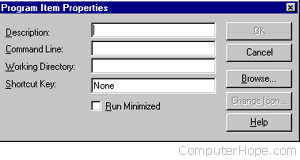
For the Description, enter what you want your icon to be named; for example, Notepad. For Command Line, enter the file location, so for Notepad, you would enter c:\windows\notepad.exe. If you don't know the path to your program, use the Browse button. Once the information is completed, click OK.