
Reference number: CH000128
In Windows when clicking a file get 'Open With'
prompt.
Issue:In Windows when clicking a file get 'Open With' prompt'.
Cause:
- The file is not associated with a
program.
- The program used to open the file
is not installed on the computer.
Solution:As shown in the below
illustration, the Open With window
may appear when a user attempts to open a file that Microsoft Windows
does not know how to handle. If you believe you have a program
capable of handling this file, locate the file within this window,
highlight it and click ok. If you do not see the program listed, click
the Other button and browse to the location of the program used to
open this file.
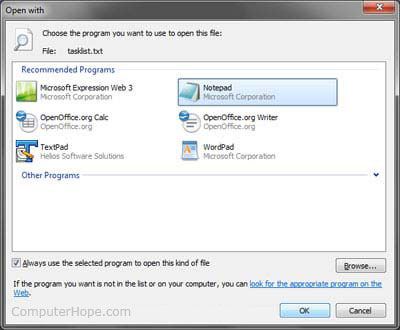
If you wish to continue to use this program to open this type of
file in the future check the "Always use this program to open
this type of file" option.
Windows 95, 98, and NT Tip: If Windows is opening the file with
the incorrect program users can press and hold the Shift key and
right-click the file to get the "Open With" option to
select a different program to open the file with. Other versions of
Windows will always has this option available.
Other Windows users: Other versions of Microsoft users can
right-click the file and choose "Open With" without holding
down the Shift key.
Additional information:
- If you are not sure what program should open this type of file
see our file extension page for a
listing of file extensions and the programs commonly used to
open the files.
- If you would like to modify how a file is opened see document
CH000572.
- If you are looking for information on how to view the contents
of the file see document CH000429.
|