
How to upload a picture or video to Facebook
Updated: 04/02/2019 by Computer Hope

Facebook is a great place to share what's happening in your life with friends and family. One of the best ways to do that is to upload pictures and videos. Whether it's a picture of your dog or a vacation video, the following section shows you how to share it on Facebook.
How to upload a picture or video to Facebook
- Log in to your Facebook account.
- On your profile page, in the top section, click the Photo/Video button.

- Locate the photo or video you want to upload, click it, and click the
 button.
Tip
Add multiple images, photos, or videos by holding the Ctrl and clicking each file individually.
- Once your image, photo, or video is ready, type a comment (A), choose where it's posted (B), or select who sees it on either medium (C). You may also post without selecting any of these options.
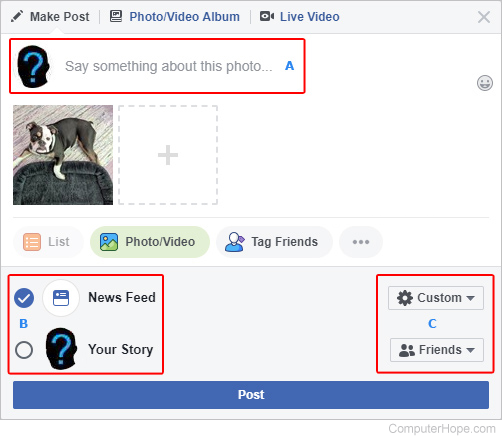
- When you're done, click the Post button.