
How to ensure the modem connects correctly
Often a modem that doesn't connect is improperly setup or a cable is loose or disconnected. Below are things that can be checked to make sure the modem connects correctly.
Two phone holes
Modems have two phone holes that allow a phone connection to be connected. Connecting the modem to the improper hole prevents the modem from working. When inspecting the back of the modem, you'll see either text or a picture describing the phone and modem hole. The cable coming from your wall connects to the line, line in, or Telco hole. The other hole allows a phone to be connected to the same line and can check for a dial tone. The picture below is an example of an internal modem with the two RJ-11 connections on the back.
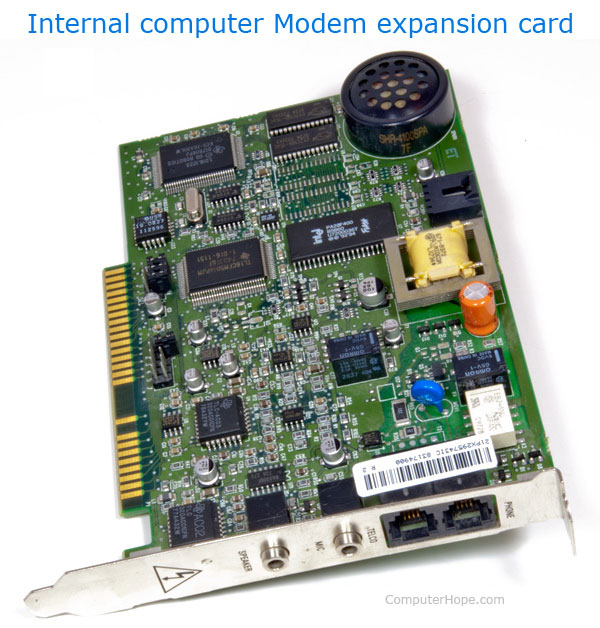
Special splitters
Some older modems may require you to connect a splitter to the modem itself. If your modem or computer included a splitter, we recommend it be used in case it's required. A splitter only applies to modems that have one connection on the back of the computer. If your computer modem does require a special splitter, it can only be obtained from the computer or modem manufacturer; a standard splitter will not work.
Connection
The standard phone hole for a modem is called an RJ-11 connection. Many computers today include a network card, which utilize an RJ-45 connection, which is extremely similar to the RJ-11 connector, but is slightly bigger. Ensure that if you have a network card and modem that you are connecting it into the correct hole. Also, make absolutely certain that you have a Modem in the computer and not only a network card. Newer computers and laptops may not included a modem.
Analog vs. digital
If you cannot get your modem to work, verify that the line you are connecting to is an analog connection. Many hotels have digital phone jacks that are not compatible. If this is the case a special connector is required to convert digital to analog. These connectors can sometimes be purchased at the hotel or a local Radio Shack.