
Missing network icon on the Windows notification area
Updated: 12/30/2021 by Computer Hope
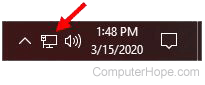
By default, the network (Internet) icon found in the Windows notification area (systray) is often turned off and not visible. To enable and show the network icon, follow the steps below for your version of Windows.
Note
Windows 11 does not allow you to hide the network icon in the Windows notification area. Because the icon is never disabled, it should never need to be re-enabled.
Windows 8 and 10
Tip
If using Wi-Fi, make sure Airplane mode is disabled on your computer before proceeding with the steps below. See: How to enable or disable Airplane Mode.
- Press the Windows key, type taskbar settings, and press Enter. Alternatively, you can right-click the taskbar and select Taskbar settings.
- On the right side of the Taskbar Settings window, scroll down to the Notification area section, and click the Select which icons appear on the taskbar link.
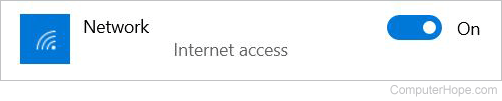
- Click the toggle to the On position for the Network icon.
or
- Press the Windows key, type taskbar settings, and press Enter. Alternatively, you can right-click the taskbar and select Taskbar settings.
- On the right side of the Taskbar Settings window, scroll down to the Notification area section, and click the Turn system icons on or off link.
- Click the toggle to the On position for the Network icon.

Windows Vista and 7
Tip
If using Wi-Fi, make sure Airplane mode is disabled on your computer before proceeding with the steps below. See: How to enable or disable Airplane Mode.
- Right-click the taskbar and select Properties in the pop-up menu.
- In the Taskbar and Start menu Properties window, click the Customize button in the Notification area section on the Taskbar tab.
- Under Icons, find the Network entry. To the right of that entry, under Behaviors, make sure Show icon and notifications is selected in the drop-down menu.
- At the bottom of the window, click the Turn system icons on or off link.
- For the Network entry under System Icons, select On in the drop-down menu to the right.
- Click the OK button on each open window to save the setting changes and close the windows.
Windows XP and earlier
- Right-click the My Network Places or Network Neighborhood icon on the desktop and select Properties. If this icon is not available, open Network Connections from the Control Panel.
- In the Network connections window, right-click the network you want to view the network icon for and select Properties. For example, right-click "Local Area Connection" and select Properties.
- Finally, in the properties window, check the Show icon in taskbar when connected or Show icon in notification area when connected box at the bottom of the window.
- Click the OK button on each open window to save the setting changes and close the windows.