
How to find the hard drive type and specifications
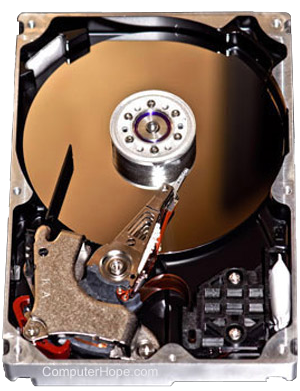
If you'd like to view detailed information about your hard disk drives, solid-state drives, or external storage devices attached to your computer, we recommend the methods below.
System Information in Windows
In Windows, you can view information about your hardware (including disks) using the System Information utility.
- System Information utility in Windows 10 and Windows 11
- Earlier versions of Windows System Information
System Information utility in Windows 10 and Windows 11
- Press the Windows key, type System Information, and press Enter.
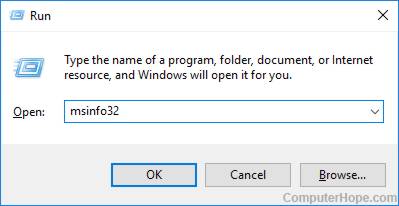
Or, you can use the Run box to open the System Information utility.
- Press the Windows key+R keyboard shortcut.
- In the Run box, type msinfo32.
- Press Enter or click OK.
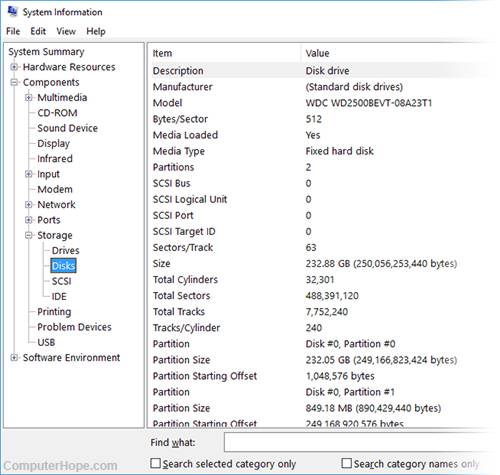
- In the System Information window that opens, in the left window pane, you'll see a list of hardware categories. Expand Components, then Storage. Then, choose Drives, Disks, or any category you'd like to view.
Earlier versions of Windows System Information
In earlier versions of Microsoft Windows, you can open the System Information utility by following the steps below.
- Click Start and then Programs.
- Click Accessories and then the System Information or System Tools folder.
- Open the System Information file.
- In the System Information window, click the + symbol next to Components.
- Click the + next to Storage and click Drives. In the right-side of the window, you see information about the hard drive including its capacity and serial number.
IBM-compatible users
IBM-compatible users can usually enter the computer's BIOS setup to view additional information about their hard drive. Commonly, the CMOS (complementary metal-oxide semiconductor) lists the hard drive's serial number, model number, cylinders, heads, sectors, and the size of the hard drive.
If the CMOS is not configured to auto-detect the hard drive, it is important to note that the hard drive values may not be correct.
Determining the speed or RPM of a hard drive
To determine the hard drive RPM (revolutions per minute) find the manufacturer and model of the hard drive in an area such as System Information in Windows.
For example, in Windows System Information we may determine that the hard drive model is: Toshiba MQ04ABF100.
Once you've determined this information, you can look up the drive on the hard drive manufacturer's web page or through a Google search to determine the RPM of the drive.
In our example, searching for the drive we determine that the Toshiba MQ04ABF100 is a 5400rpm SATA 7mm 2.5" drive.
Some manufacturers also list the RPM of the hard drive on the actual drive. If you open the computer and remove the hard drive, look on the top sticker to see if the RPM is listed.
Third-party utilities
There are many free software utilities designed to detect the hardware in your computer. These utilities can display the model of your hard drive and additional information.
Viewing S.M.A.R.T. hard drive information
All modern hard drives now include S.M.A.R.T. to help detect and find problems with hard drives before they happen. In addition to detecting problems, S.M.A.R.T. also gives details about the hard drive including such information as the life of the hard drive. See our S.M.A.R.T. term for further information about this tool and how to access its information.
Other disk utilities
Many disk utilities designed to set up the hard drive will properly detect and configure it. Also, these utilities may also provide the user with some basic additional information about the hard drive.
For example, using the fdisk utility you can display additional information about the size of the hard drive and partition information.
Other methods of determining the hard drive
One of the best methods for determining additional information about a hard drive is to obtain information directly off the hard drive. The majority of hard drives have a sticker on the top of the drive containing complete information about the drive. If you cannot locate the information you need through software, we recommend you open the case and remove the hard drive to get the information you need.
Product listing or specifications
If you're trying to list all the specific information about your computer, specifying the manufacturer, model, type, and size of the hard drive is sufficient. Below is an example of how this may look.
Maxtor 54098H8 IDE 40Gig hard drive
Drivers or installation
Replacement or repair
If you're trying to determine the hard drive because it needs to be replaced or repaired, we recommend the drive be replaced with another hard drive. As long as you are using the same hard drive interface (IDE/SATA), the model or manufacturer of the previous drive should be irrelevant.