
How to view hidden files and folders in Windows

To unhide and view hidden files and folders in Microsoft Windows, select your version from the list below and follow the steps.
View hidden files and folders in Windows 11
- Press Windows key+E to open File Explorer.
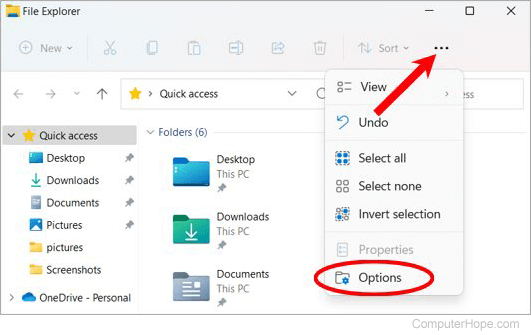
- In the File Explorer window, click the See more menu
 icon on the right side of the menu bar.
 - Select Options from the drop-down menu.
- In the Folder Options window, click the View tab.
- In the Advanced settings section, under Hidden files and folders, select the Show hidden files, folders, and drives option.
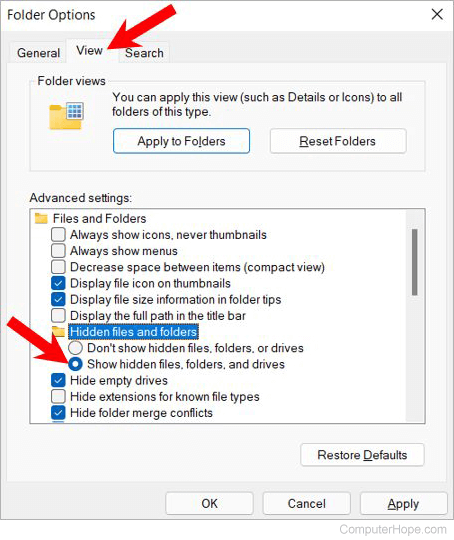
- Click Apply, then OK.
If you do not want to see hidden files in Windows, select the Don't show hidden files, folders and drives option in step 5 above.
See additional information for further information and related questions.
View hidden files and folders in Windows 8 and 10
- Press Windows key+E to open File Explorer.
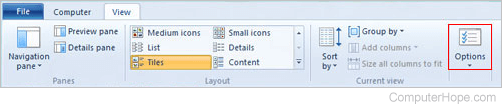
- In the window, select the View tab in the top-left corner.
- Locate and click Options on the right side, or click the down arrow and select Change folder and search options.
- In the Folder Options window, select the View tab.
- Locate the Advanced settings section of the window.
- Under Hidden files and folders, select Show hidden files, folders and drives.
- Click Apply, then OK.
If you do not want to see hidden files in Windows, select the Don't show hidden files, folders and drives option in step 6 above.
See additional information for further information and related questions.
View hidden files and folders in Windows Vista and Windows 7
- Press Windows key+E to open File Explorer.
- In the File Explorer window, click Organize in the top-left corner.
- From the drop-down menu, select Folder and search options.
- In the Folder Options window, select the View tab.
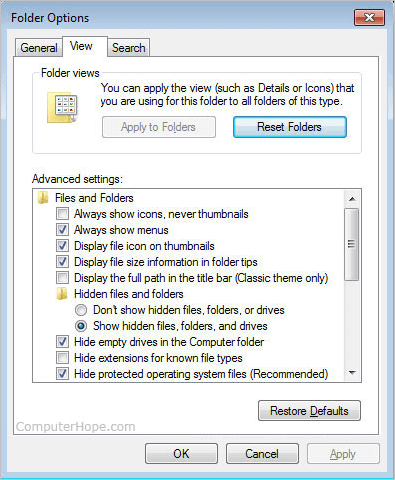
- Locate the Advanced settings section of the window.
- Under Hidden files and folders, select Show hidden files, folders and drives.
- Click Apply, then OK.
If you do not want to see hidden files in Windows, select the Don't show hidden files, folders and drives option in step 6 above.
See additional information for further information and related questions.
View hidden files and folders in Windows XP
- Click Start and then My Computer.
- Click Tools and then Folder Options.
- In the Folder Options window, click the View tab.
- On the View tab, under Advanced Settings, select Show hidden files, folders and drives.
- Click Apply, then OK.
If you do not want to see hidden files in Windows, select the Don't show hidden files, folders and drives option in step 4 above.
See additional information for further information and related questions.
Additional Information
How do I know if it worked?
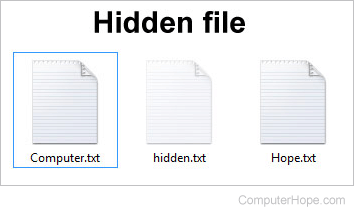
When enabled, you can distinguish a hidden file from other files by looking at the icon, which should appear fainter (slightly grayed out like the hidden.txt file below). You can also look at the file attributes or file properties to see if the file you're viewing is hidden.
It is important to realize that files can also be hidden using a program or other commands. To view these files, you need access to the program used to lock the files. Files may also have file permission rights that allow or prevent users from viewing the files. To view these files, you must be given the appropriate rights by the administrator.
Users will sometimes delete files critical to certain system utilities or programs. It is okay to delete hidden files as long as you know what they are used for.