
Computer always boots into Windows Safe Mode
First, make sure the computer is really booting into Safe Mode. If the computer is booting into Safe Mode when the computer first starts, a message about Safe Mode appears, similar to the example below. If you do not receive this message, the computer is booting into Normal Mode and it looks like Safe Mode.
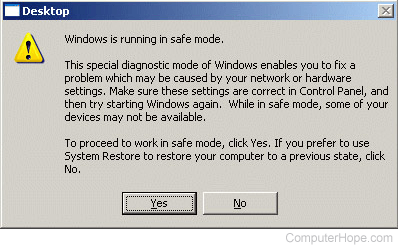
Booting into Normal Mode, but looks like Safe Mode
If you don't receive the above Safe Mode message, it's likely that the computer appears to be booting into Safe Mode because of the video resolution. Make sure your video resolution is set higher than 800 x 600 and that the proper video card drivers are installed on the computer.
Computer is always booting into Safe Mode
If you do receive the above Safe Mode message each time the computer boots, you are encountering an issue that is preventing Windows from loading normally.
Make sure the computer is not rebooting because of an error by disabling automatic restart on system failure. To do this, enter the Windows Advanced Options Menu through the boot menu and choose Disable automatic restart on system failure.
After this feature is disabled, try booting the computer into Normal mode and see if it encounters an error when it starts up. It will most likely be a blue screen error message.