
How to change security level in Microsoft Office applications
Updated: 07/31/2022 by Computer Hope

To change the security in Microsoft Office applications, like Microsoft Word and Excel, follow the steps below.
- Open Microsoft Excel, Outlook, PowerPoint, or Word.
- Click the File tab in the Ribbon.
- In the left navigation menu, click Options at the bottom.
- In the Options window, click Trust Center in the left navigation menu.
- Select the security level for that application.
- Click the Trust Center Settings button.
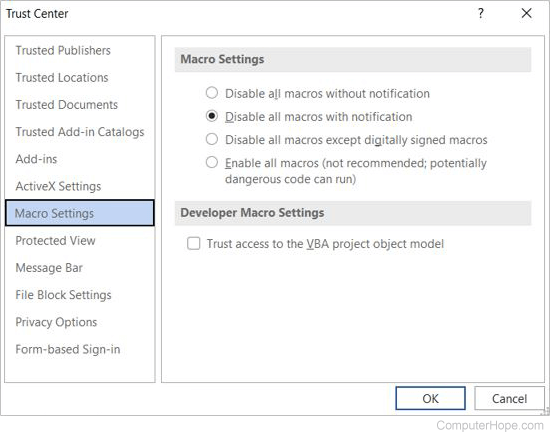
- In the Trust Center window, select the Macro Settings option on the left, if not already selected.
- Select the desired security setting for macros.
Tip
You can view and adjust other security-related settings through the Trust Center window by selecting other options in the left menu.
Note
It is important to realize that changing the security in one Microsoft Office program does not affect other Office applications. In other words, if you change Microsoft Excel's security setting, Microsoft Word's security setting remains unchanged.