
How to create a directory or folder

There are multiple ways to create or add a folder, subfolder, directory, and subdirectory on a computer. The methods for doing so depend on the operating system or where the directory is being created. Select a link below for steps on creating a directory or folder in each major operating system.
Creating a folder in Microsoft Windows
There are a few ways to create a folder in Microsoft Windows, generally depending on where you want the new folder to be placed. To proceed, select a method from the list below or check out each section individually.
My Computer or Windows Explorer
- Press the Windows key+E to open Windows Explorer.
- On the left side of the window, select the drive or folder where you want to create the new folder; for example, the C: drive. Or, you can create a folder in the root directory.
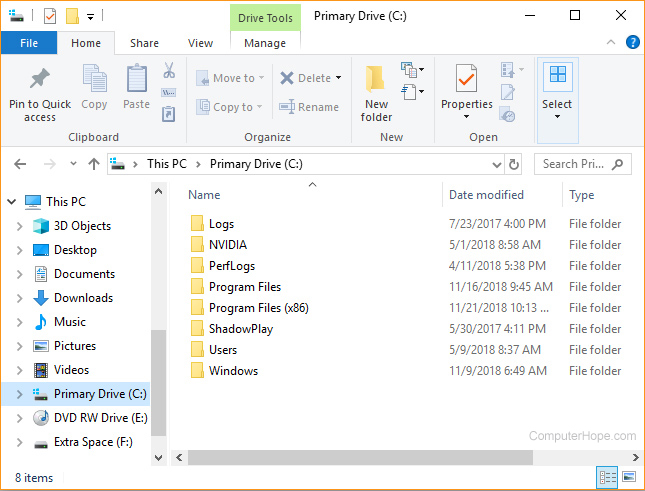
- In Windows 11, click the New option in the menu bar and select Folder in the drop-down menu.
In Windows 8 and 10, on the Home tab, click the New folder icon.
In Windows 7 and earlier, in the file menu bar, click File and select Folder in the drop-down menu.
In all versions of Windows, you can also right-click on a blank portion of the folder, select New, and then Folder from the drop-down menu.
If you're using Windows 7 or earlier, and do not see the file menu bar at the top of Windows Explorer, press Alt to make it visible.
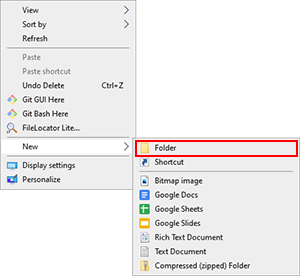
Windows desktop
- Navigate to the Windows desktop. You can quickly do this with the keyboard shortcut Windows key+D.
- Right-click any blank portion of the desktop.
- In the menu (like that shown in the picture), click New and then Folder.
- Once the new folder appears, type a name for it and press Enter.
Create a new folder using a keyboard shortcut
While in Windows Explorer, press Ctrl+Shift+N to create a new folder without using the mouse.
Windows command line
See the following MS-DOS and Windows command line user section to create a directory in the Windows command line.
Creating a directory in MS-DOS and Windows Command Prompt
It is more appropriate to use the term "directory" instead of "folder" when referring to the command line.
To create a directory in MS-DOS or the Windows Command Prompt (cmd), use the md or mkdir MS-DOS command. For example, below, we are creating a new directory called "hope" in the current directory.
mkdir hope
You can also create multiple new directories in the current one with the md command. In the following example, we are creating three new directories, called "user1," "user2," and "user3," in the current directory.
md user1 user2 user3
To create a directory with spaces, you must surround the directory name with quotes. In the example below, we create a "my example directory" in the current directory.
md "my example directory"
To create a directory in the parent directory without first moving to that directory, you can use the command below. The example below moves back one directory to create the "example" directory.
md ..\example
To create a subdirectory in a different directory without moving to it, use a command similar to the example below. This command creates a "test" directory in the hope directory.
mkdir hope\test
Once a directory is created, you can use the cd command to change and move to that directory.
To make a directory in another drive without moving to that drive, use a similar command to the example below. The following command creates an "example" directory on the F: drive. (The drive letter "f" should be substituted for the actual drive letter of the disk where you're creating the folder: "c", "d", etc.)
md f:\example
Create a directory with a batch file
A batch file consists of one or more commands that are entered into the command line. Therefore, you can use any examples from the section above in a batch file to create a new folder.
Creating a directory in Linux, Unix, and their variants
It's traditional to call it a "directory" instead of "folder" in the command line, but both terms refer to the same thing.
You must have administrator permissions to create a new directory outside your home directory and its subdirectories.
To create a directory in Linux, Unix, or any variant, use the mkdir command. For example, below, we are creating a new directory called "hope" in the current directory.
mkdir hope
To explicitly specify that the new directory should be located in the current directory, you can prefix its name with a dot-slash ("./"):
mkdir ./hope
To create a directory whose parent directories do not yet exist (creating the parent directories in the process), use the -p option with mkdir:
mkdir -p hope/files/documents
Once the new directory is created, you can use the cd command to change and move to that directory. To remove the directory (if it is empty), use the rmdir command. To change the permissions of a directory after it is created, use the chmod command.
Creating a folder and directory in Microsoft Windows 3.X
File Manager
- Open File Manager
- Open the folder where you want to place the new folder, and on the top menu of File Manager, select File and then new folder.
MS-DOS
See the MS-DOS user section above for information about creating a directory in MS-DOS.
Creating a folder in macOS
Desktop folder
- Navigate to the macOS desktop.
- Right-click (tap two fingers on the trackpad or multi-touch mouse) any blank space on the desktop.
- Select New Folder from the drop-down menu.
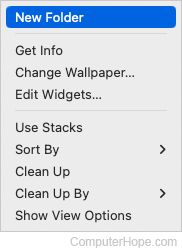
- Type a name for the folder and press Return.
Create a folder in a directory
- Open Finder and navigate to the directory where you want to create the folder.

- Click File in the upper-left corner of the screen.

- Select New Folder in the drop-down menu.
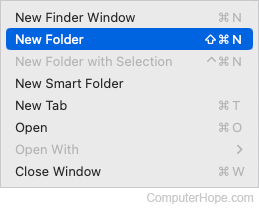
- Type a name for the folder and press Return.
To create a directory in the Terminal command line, see the Linux steps.