
How to delete a file, directory, or folder

Now and then, it is a good idea to clean up your drives and delete duplicate photos, documents, temporary files, shortcuts, videos, or other unneeded or unused files and folders. The steps to delete a computer file, directory, or folder vary on the method you want to use and your operating system. To proceed, choose from the list of options below and follow the instructions.
How to delete files in Microsoft Windows
Microsoft Windows users can delete an unwanted file or folder (directory) from a hard drive or external disk drive using multiple methods. Below are the more common methods for deleting a file or folder in Microsoft Windows.
To delete a hidden file in Windows, you first need to set hidden files to be visible. See: How to view hidden files and folders in Windows.
Users not familiar with Windows should realize that if you delete a folder or directory, all files and folders in that folder or directory are deleted.
The steps below are for deleting a single file or folder. However, the user can use the same steps to delete multiple files or folders. For help with selecting multiple files, see: How to select or highlight multiple files and folders.
Delete key
Locate the item you want to delete, highlight it by left-clicking the file or folder with your mouse once, and press Delete. You can browse the location of the file or folder using My Computer or Windows Explorer.
Delete multiple files or folders by pressing Ctrl and clicking each file or folder before pressing Delete.
Hold down Shift while pressing Delete to prevent files from going to the Recycle Bin when deleted.
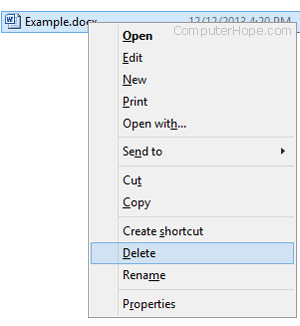
Delete file or folder by right-clicking
Open My Computer or Windows Explorer. We recommend you make sure the directory or folder is empty before proceeding, unless you intend to delete everything in it. Locate the file or folder you want to delete and right-click it. Choose the Delete option from the pop-up menu.
How to delete from the local disk
The local disk contains files and folders that are imperative for your computer to run correctly. Unless you know what you are deleting, please do not delete any files from this section.
Open My Computer or Windows Explorer. On the left side of the screen, click This PC. On the right side of the screen, locate and double-click the local disk (usually C: or D:). Double-click the folder containing the file you want to delete. Select the file or folder you want to delete, click File in the top menu bar, and select Delete.
How to delete from an external drive
To delete from a USB (universal serial bus) flash drive, floppy drive, memory card, or external hard drive, open My Computer or Windows Explorer. On the left side of the screen, click This PC. On the right side of the screen, locate and double-click the drive, which is labeled as USB, flash drive, external hard drive, or the manufacturer's name. Select the file or folder you want to delete, click File in the top menu bar, and select Delete.
Delete from the file menu
Open My Computer or Windows Explorer. Locate and select the file or folder you want to delete, click File in the top menu bar, and select Delete.
If the File menu is not visible in My Computer or Windows Explorer, press Alt to make the menu bar visible, including the file menu.
Problems during delete
Some documents and folders may be protected from deletion through encryption or password protection. In this case, you may be asked for a password to decrypt or remove the password protection.
A file may be set as read-only, meaning the user can only open it for viewing and not modify or delete it. When trying to delete a read-only file, you get a message stating the file is write-protected and cannot be deleted. You must have write permissions to delete the file.
Some files may only be deleted with administrator permissions. To delete these files, you would need to have administrator rights on the computer. If you are using a work computer, the technical support staff often are the only users with administrator rights on the computer.
Another possible cause of problems with deleting a file or folder is a virus or malware infection. Viruses and malware can prevent files or folders from being modified or deleted. If this is the case, to remove the virus or malware infection to delete the affected file or folder.
Windows command line
See the MS-DOS and Windows command line section below for information about deleting a file or folder at the Windows command line.
Uninstalling a program
See our uninstalling a program steps for help with uninstalling (deleting) programs from the computer.
How to restore a deleted file or folder
If you've deleted a file by mistake, see our page below about how to restore a deleted file for further information on recovering a deleted file.
How to delete files in MS-DOS and the Windows command line
Realize that any deleted file or directory in MS-DOS is not sent to the Windows Recycle Bin.
Before you follow any of the steps below, you must get to an MS-DOS prompt or the Windows command line. If you are new to the command line, you may also want to read through the following pages first.
Files
MS-DOS users can delete files using the del command. See this page to get additional information and help with this command. Below is an example of how to use this command.
del example.txt
As seen in the example above, when deleting a file, enter the full file name, including the file extension.
The del command can delete any file.
Delete multiple files
Wildcards can delete multiple files or a group of files, as shown in the example below.
del *.txt
In the example above, this command would delete all text files that end with a .txt file extension.
The del command can delete any file extension.
Directory
MS-DOS users can delete directories (dir) in MS-DOS using the deltree command or rmdir command. See either of these links for additional information about these commands. Below is an example of how to use this.
rmdir example
If the directory is full or has other subdirectories, you get an error message. To delete a full directory, use a switch with the above example. For example, "rmdir example /s" to remove a full "example" directory. See our deltree command or rmdir command for additional examples and switches.
Deleting a subdirectory
To delete a subdirectory, subfolder, folder within a folder, or directory within a directory, use a command similar to the example below.
rmdir example\test
In the example above, the "test" directory in the "example" directory is deleted. You could also use the cd command to change the directory to the example directory and then delete the "test" directory using our first example shown above.
How to delete a directory or file name with a space
To delete a directory or file name with a space in the name, you must surround the directory or file name with quotes, as shown below.
del "my example file.txt"
rmdir "my example directory"
In the examples above, we are deleting the file named "my example file.txt" with quotes surrounding the complete file name and extension and removing the "my example directory" directory.
The rmdir command can delete any file.
How to delete files in Linux, Unix, and other variants
Files
Linux and Unix users can delete files through the console using the rm command. See this page for additional information about this command. Below is an example of how to use this command.
rm example.txt
As seen in the example above, when deleting a file, enter the full file name, including the file extension.
The rm command can delete any file.
Delete multiple files
Wildcards can delete multiple files, as shown in the example below.
rm *.txt
In the example above, this command would delete all files with a .txt file extension.
The rm command can delete any file of file extensions.
Directory
Linux and Unix users can delete folders through the console with the rmdir command. See this page for additional information about this command. Below is an example of how to use this command.
rmdir example
Like Microsoft Windows, with Linux and Unix, files can be deleted through the GUI (graphical user interface) by locating the file and pressing the delete key on the keyboard.
Deleting a subdirectory
To delete a directory in another directory (subdirectory), use a command similar to the example below.
rmdir example\test
In the example above, the "test" directory in the "example" directory would be deleted. Alternatively, use the cd command to change the directory to the example directory and then delete the "test" directory using our first example shown above.
How to delete a directory or file name with a space
To delete a directory or file name with a space in the name, you must surround the directory or file name with quotes, as shown below.
rm "my example file.txt"
rmdir "my example directory"
In the examples above, we are deleting the file named "my example file.txt" with quotes surrounding the complete file name and extension. We are also removing the "my example directory" directory.
The rmdir command can delete any file.
How to delete files on macOS
Apple macOS users can delete photos, documents, or other files and folders (directories) utilizing various methods. The sections below contain the most common ones.
If you delete a folder in macOS, all it's contents (files, images, videos, etc.) are deleted too.
The steps below are for deleting a single file or folder. However, the same steps apply to multiple files or folders if you select them first. See: How to select or highlight multiple files and folders.
Using the delete key
Pressing the delete key on the keyboard by itself does not remove an object (like a file or folder) in macOS. To delete a file or folder with the delete key, follow these steps.

- Navigate to the file or folder you want to delete.
- Left-click an object to select it.
- Press and hold the Command key, then press delete.
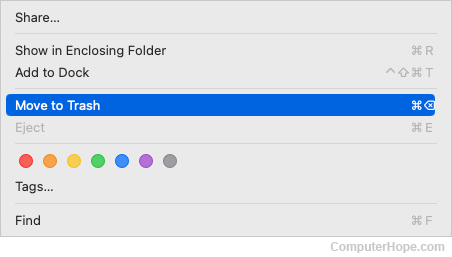
Right-click and choose Move to Trash
- Navigate to the file or folder you want to delete.
- Right-click the file or folder.
- Select the Move to Trash option from the drop-down menu.
Delete using the file menu
- Navigate to the file or folder you want to delete.
- Click the file or folder so that it is selected.
- In the menu bar at the top of the screen, click File.

- Select Move to Trash near the bottom of the drop-down menu.
Deleting in Terminal
To delete files or directories in the Terminal command line, use the rm command.
How to delete files on Microsoft Windows 3.X
File Manager
- Open File Manager
- Locate the folder or file you want to delete, then click File and Delete.
MS-DOS
See the MS-DOS user section above for information about deleting a directory in MS-DOS.