
How to change a username or password
Below are the steps to change your username or password in major operating systems, online services, and other locations.
Unless you're the administrator or root of the system, you must know the account's password before it can be changed.
Changing the username and password in Windows 11
Change password
- Press the Windows key, type sign-in options, and press Enter.
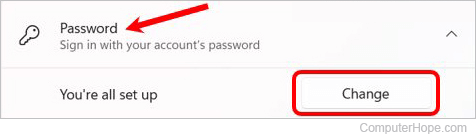
- On the Sign-in options page, click the Password option, and then the Change button.
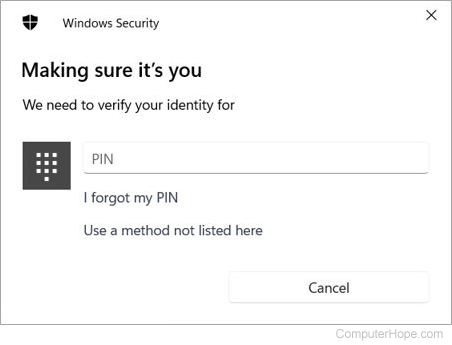
- Verify your account by entering your Microsoft PIN (personal identification number).
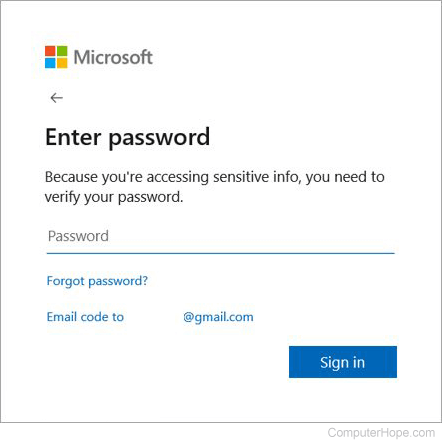
- Enter your current account password.
- To verify your identity, select the method to receive a code from Microsoft. Depending on your account profile, you may have more than one option.
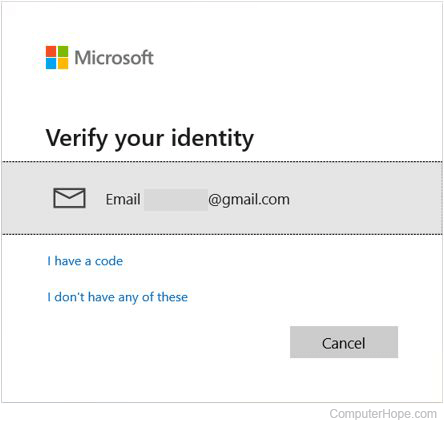
- Enter the verification code you received by the method selected in the previous step, and click the Verify button.
- Type your current password (A), type a new password (B), and click the Next button (C).
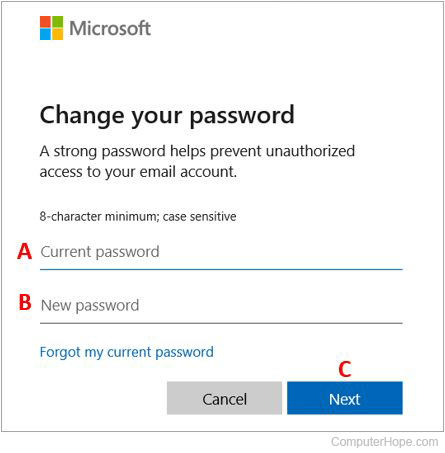
- Click the Finish button to complete the password change.
Change username
You may only change local accounts names, not Microsoft or administrator account names.
- Press the Windows key, type control panel, and press Enter.
- Select User Accounts.

- Click User Accounts again.

- Near the middle of the window, click Manage another account.
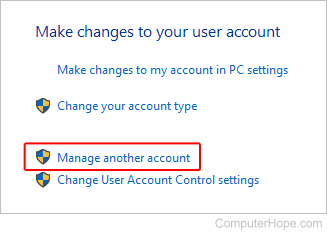
- Select the account whose name you want to change.
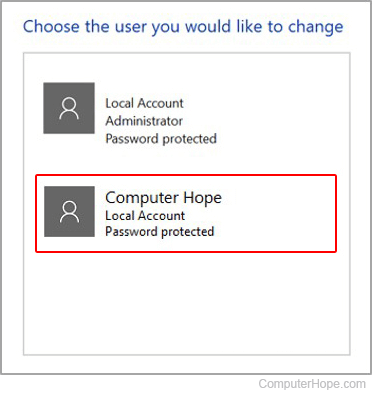
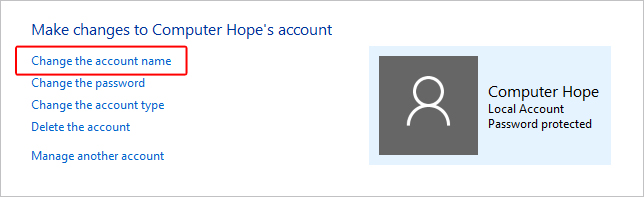
- Select Change the account name.
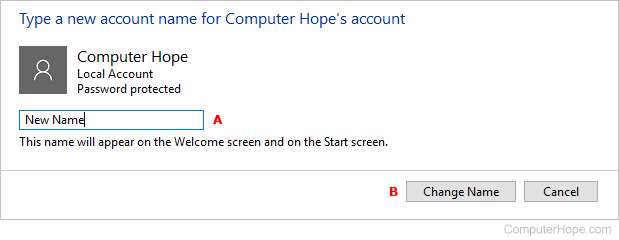
- Choose a new account name (A) and click the Change Name button (B).
Changing the username and password in Windows 10
Change password
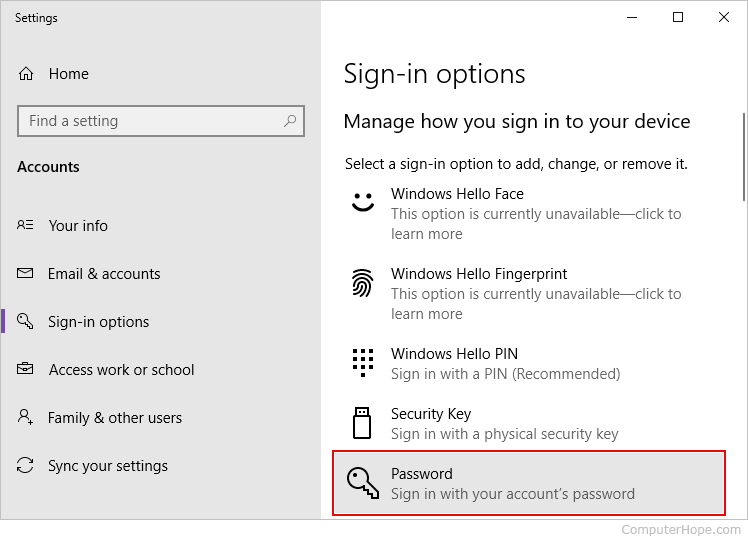
- Press the Windows key, type sign-in options, and press Enter.
- In the section to the right, click Password to expand the section.
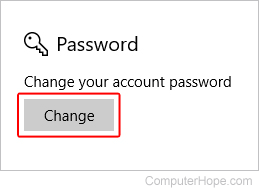
- In the Password section, click the Change button.
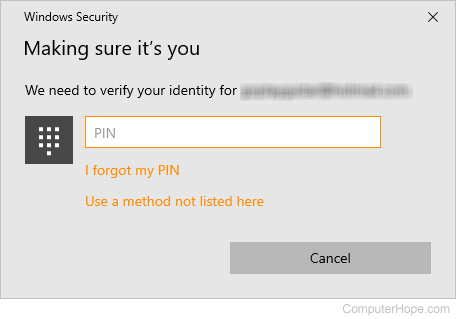
- Verify your account by entering your Microsoft PIN.
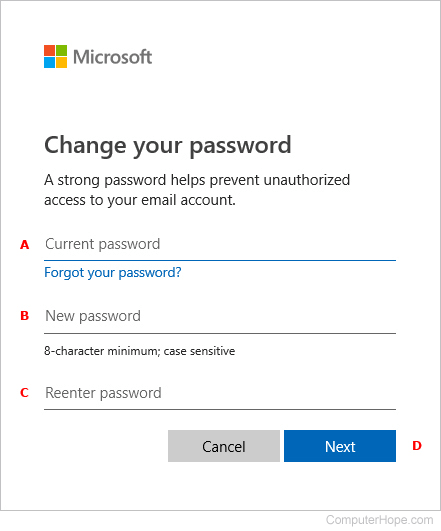
- Type your current password (A), type a new password (B), confirm your new password (C), and click the Next button (D).
Change username
You may only change local accounts names, not Microsoft or administrator account names.
- Press the Windows key, type control panel, and press Enter.
- Select User Accounts.
- Click User Accounts again.
- Near the middle of the window, click Manage another account.
- Select the account whose name you want to change.
- Select Change the account name.
- Choose a new account name (A) and click the Change Name button (B).
Changing the username and password in Windows 8

Change password
- Open the Charms menu by pressing Windows key+C and selecting Settings.
- In Settings, select Change PC settings.
- In PC Settings, select Users.
- Select the Change your password option to change the password for your local Windows account.
Change username
- Open the Charms menu from the Windows desktop by pressing Windows key+C and selecting Settings.
- In Settings, select Control Panel.
- Select User Accounts.
- In the User Accounts window, select Change your account name to change the username for your local Windows account.
Changing the username and password in Windows Vista and 7
Change password
- Open the Control Panel.
- Click Add or remove user accounts.
- Click the account you want to change.
- Click Change the password.
Change username
- Open the Control Panel.
- Click Add or remove user accounts.
- Click the account you want to change.
- Click Change the account name.
Changing the username and password in Windows XP
Change password
- Open the Control Panel.
- Double-click the Users Accounts icon.
- Select the account you want to change.
- Select the option Change my name to change your username or Create a password or Change my password to change your password.
Windows XP Home users can only change the administrator password through Safe Mode.
Change username
- Open the Control Panel.
- Double-click the Users Accounts icon.
- Select the account you want to change.
- Click Change My Name.
- Enter the new name you want to use and click the Change Name button.
Changing the username and password in Windows 2000
Change password
Microsoft Windows 2000 users can change their username by pressing Ctrl+Alt+Del while in Windows to open the Windows Security window. From this window, click the Change Password button.
Enter your old password and the new password you want to use.
Change username
To change the username of an account on Windows 2000, you need an account with administrator rights. Follow the steps below if you are logged in with an administrator account.
- Open the Control Panel.
- Double-click the Users and Password icon.
- Make sure the Users must enter a user and password to use this computer option is checked.
- Highlight the account you want to change the username for and click the Properties button.
- In Properties, change the username.
Changing the username and password in Windows 95, 98, and Me
Change password
To change your password or password settings in Windows 95, 98, or ME, follow the steps below.
- Open the Control Panel.
- Double-click the Passwords icon.
- In the Password Properties window, click the Change Windows Password button.
The Windows password can also be changed through the Users icon in Control Panel.
Change username
Change user settings in Windows 95/98 through the Users icon in Control Panel. However, this does not allow you to change the actual username. If you must change the username, we suggest you create a copy of your existing username and use the new username. Below are the steps to do this.
- Open the Control Panel.
- Double-click the Users icon.
- Highlight the user you want to make a copy of and click the Make a copy button.
- Follow the wizard in creating a new user account.
Changing the Windows password via command prompt
Change a Windows account password through the Windows command line interface by following the steps below.
- Open an elevated command prompt.
- At the prompt, type the following command.
net user username password
Enter the Windows account name for username, and enter the new password for password. For example, if the Windows account is "JohnDoe" and you want to change the password to "newpass1234," type the command below.
net user JohnDoe newpass1234
If you don't want anyone to see the new password, use the following command instead, typing an * (asterisk) instead of the new password.
net user username *
Entering an asterisk instead of the actual password results in a prompt to enter the new password. However, the password you type is not displayed, preventing other people from seeing it.
Changing the username and password in Apple macOS
How you change a password on an Apple computer, such as an iMac or MacBook, depends on the version of its operating system. To proceed, select the appropriate entry from the list below and follow the steps. If you're unsure which version is on your device, see our page: How to determine the version of macOS on a computer.
macOS Ventura and Sonoma
Here is how to change a password in macOS versions 13 and 14.
- Log in to the appropriate account.
- At the top-left corner of the desktop screen, click the Apple icon.
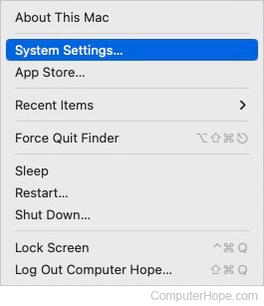
- Select System Settings from the Apple menu.
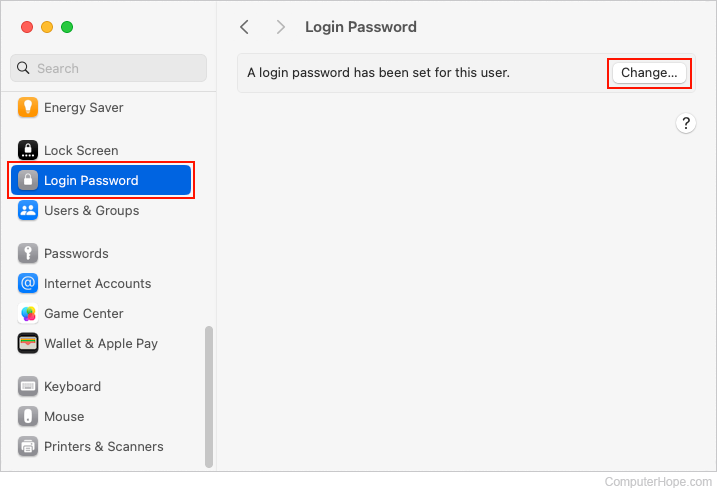
- In the sidebar, scroll down and click the Login Password selector. Then, in the section to the right, click the Change button.
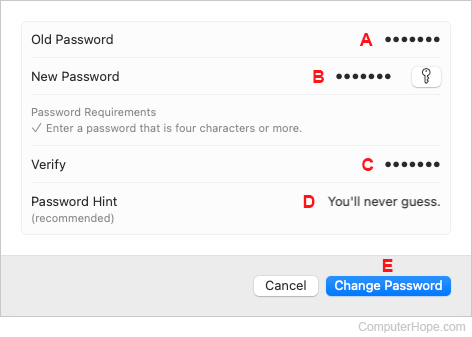
- Type your old password (A). Type a new password (B). Confirm the new password (C). Optionally, add a password hint (D). When you're finished, click the Change Password button (E).
macOS High Sierra, Mojave, Catalina, Big Sur, and Monterey
Here is how to change the account password in macOS versions 10.13 through 12.
- Log in to the appropriate user account.
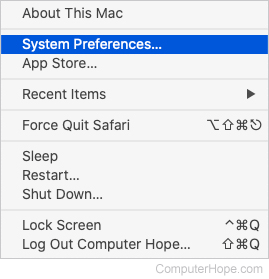
- In the menu bar, click the Apple icon to open the Apple menu.
- In the Apple menu, click System Preferences.
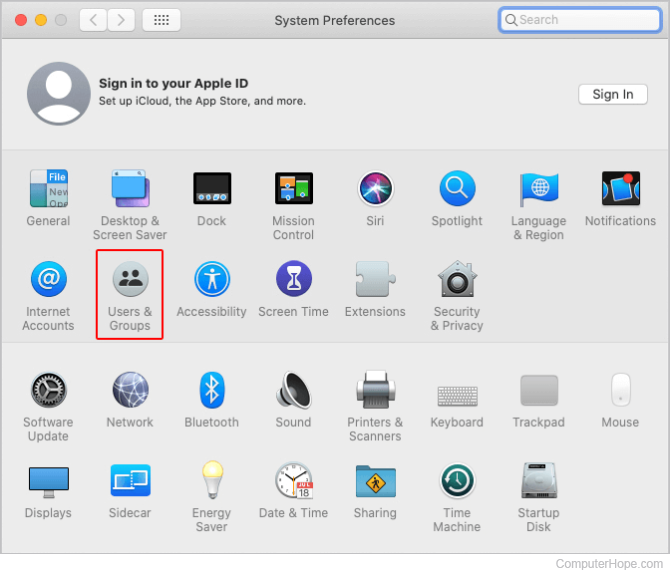
- In the System Preferences menu, select Users & Groups.
- You may need to click the lock button if it appears to be locked and enter the administrator password.

- Select the user account you want to change. Then, in the section to the right, click the Reset Password or Change Password button.
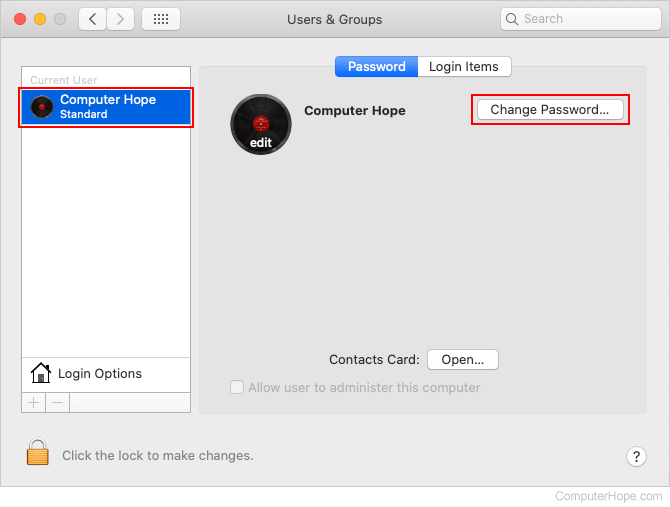
- In the New Password and Verify fields, type the new password.
- After entering the new password, click the Reset Password or Change Password button again.
macOS 10.3 to 10.5.8
- Log in using an administrator account.
- In the Apple menu, select System Preferences.
- In the View menu, select Accounts.
- You may need to click the lock button if it appears to be locked. Enter the administrator password.
- Select the user account you want to change.
- Click Reset Password or Change Password.
- In the New Password and Verify fields, type the new password.
- After entering the new password, click the Reset Password or Change Password button again.
- If a dialog window pops up, click OK.
macOS 10.2 to 10.2.8
- Log in using an administrator account.
- In the Apple menu, select System Preferences.
- In the View menu, select Accounts.
- You may need to click the lock button if it appears to be locked.
- Select the user account you want to change.
- Select the Edit User option.
- In the New Password and Verify fields, type the new password and click OK.
- If a dialog window pops up, click OK.
macOS 10.1.5 or earlier
- Log in using an administrator account.
- In the Apple menu, select System Preferences.
- In the View menu, select Users.
- You may need to click the lock button if it appears to be locked.
- Select the user account you want to change.
- Select the Edit User option.
- In the New Password and Verify fields, type the new password and click Save.
Changing the Apple iPad and iPhone passcode
Change passcode
- On the iPad or iPhone, access the Settings app.
- On the Settings screen, scroll down and tap Touch ID & Passcode.
- Enter your current passcode.
- On the Touch ID & Passcode screen, tap Change Passcode.
- Enter your current passcode again, then enter your new passcode.
- Enter your new passcode again to confirm.
Add passcode
- On the iPad or iPhone, access the Settings app.
- On the Settings screen, scroll down and tap Touch ID & Passcode.
- On the Touch ID & Passcode screen, tap Turn Passcode On.
- Enter a passcode to use when unlocking your device.
- Enter the passcode again to confirm.
- If prompted, enter your Apple ID password.
Remove passcode
- On the iPad or iPhone, access the Settings app.
- On the Settings screen, scroll down and tap Touch ID & Passcode.
- Enter your current passcode.
- On the Touch ID & Passcode screen, tap Turn Passcode Off.
- On the Turn Off Passcode? prompt, tap Turn Off.
- If prompted, enter your Apple ID password.
Changing the username and password in Linux and Unix and most variants
Change password
Almost all Linux and Unix operating systems, including variants like Debian, Kali, and Red Hat, can access the passwd command. Enter this command at the prompt to change your password. You need to know the current password before being able to change the password to a new password.
See the passwd command page for additional information about this command.
Change username
To change the username, you must have root or super-user access.
To change the username of an account, use the vipw command. See the vipw command page for additional information about this command.
To change the user settings, use the chfn command. See the chfn command page for additional information about this command.
Changing BIOS passwords
Change password
The system password appears immediately after turning on the computer, and the BIOS password is changed through the BIOS setup.
Change username
The computer BIOS does not have a username, only a password.
Changing Internet username and passwords
Changing your Internet username or password is based on your ISP (Internet service provider) and their policy for changing the username and password. Often, most ISPs allow you to change your password whenever it's needed. However, they often do not allow the account username to be changed.
Because every Internet service provider and web host is different, we suggest you contact the company for additional help with changing your username or password.
Changing online forum account password
Like the Computer Hope forums, most forums allow the users to change their password only through the profile or account settings. However, most companies do not allow you to change your username. Usually, you must create a new account to do this. If you need additional help with changing your username or password on another website, we suggest you contact the company or webmaster in control of that website.
If you cannot access an online account because you don't know the username or password, look for a link on the account login page for retrieving a forgotten username or password. This option helps in determining what your username or password is or helps in resetting your account password.
If you know your current online account password and want to change it, log in to your account, access its profile or settings, and change the password. For example, to change the password for an AOL (America Online), Gmail, Outlook, or Yahoo e-mail account, log in to your mail account through an Internet browser. Then, access your account settings and look for an option to view or change the password.