
How to change a directory or open a folder
Below is information about how to navigate to or change the directory or folder while working on a computer. Click the operating system you are looking for information on how to change directories or folders.
Microsoft Windows
To change or open directories (folders) while in Microsoft Windows, open either My Computer or Windows Explorer and double-click the folder you want to open. For example, if you wanted to move into the "Boot" folder of the current "Windows" folder shown in the picture below, you would double-click the "Boot" folder. You can also right-click the "Boot" folder and select Open in the pop-up menu.
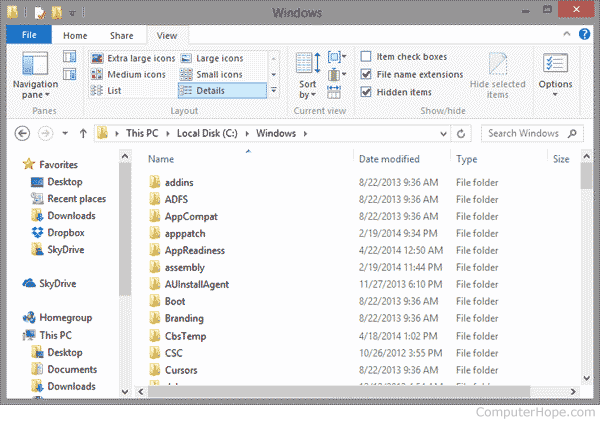
To go back to the previous folder, click the back arrow (arrow pointing left), or click the name of the location in the path you want to move. For example, in the above picture, the path is "This PC > Local Disk (C:) > Windows," to get back to the C: drive we would click "Local Disk C:" text.
You can also use the back button (thumb button) on your mouse to move back a folder.
If you have difficulties double-clicking, you can also highlight the folder by clicking it once and press Enter to open the folder.
Microsoft Windows users can also change directories at the Windows command line (MS-DOS) as explained below.
MS-DOS and the Windows command line
To change directories while in MS-DOS or the Windows command line, use the cd command. Below are some basic examples of how this command can change directories.
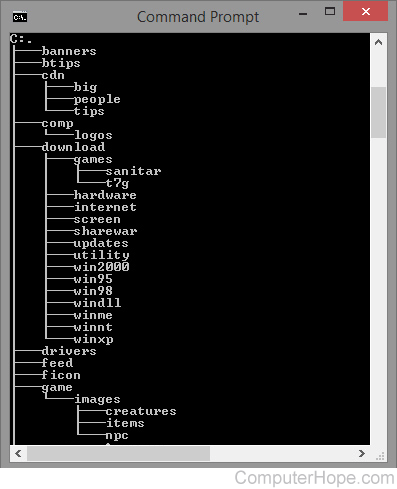
Before changing directories, you must know what directories are available in the current directory. To do this, use the dir command. For example, type the following command to only list directories in the current directory.
dir /ad
See the dir command page for further information and examples of this command. The picture shows the tree command that lists all directories and subdirectories from your current location.
Once you have a directory name, type a command similar to the command below, which is moving into the Windows directory.
cd windows
If you must move into multiple directories with one command, you can use a command similar to the example below. In this example, the command would move into the system directory, a subdirectory of the Windows directory.
cd windows\system
If you must move back a directory (parent directory), you can use the following command. For example, if you were in the Windows directory when you typed this command, it would move you back one directory to the C:\ directory.
cd..
If you were in more than one directory (e.g., C:\Windows\System32) and wanted to move back to the root directory, you could use the following command.
cd\
Related information
- See the cd command page for further information and examples of this command.
- How to use the Windows command line (DOS).
Linux and Unix
To change directories while in a *nix environment, use the cd command. Below are some basic examples of how this command can change directories.
Before changing directories, you must know what directories are available in the current directory. To do this, use the ls command. For example, type the following command to only list directories in the current directory.
ls -d */
See the ls command page for further information and examples of this command. Once you know the directory is available, type a command similar to the command below. The example below changes into the public_html directory.
cd public_html
If you must move into a subdirectory with one command, you can use a command similar to the example below. In the example below, the command would move into the cgi-bin directory, which is in the public_html directory.
cd public_html/cgi-bin
If you must move back a directory (parent directory), you can use the following command. For example, if you were in the public_html directory when you typed this command, it would move you back into the home directory.
cd ..
There must be a space between cd and the two periods.
If you were in more than one directory (e.g., public_html/cgi-bin) and wanted to move back to the home directory, you could use the following command.
cd ~
To return to the root directory, change directory to / (a single forward slash):
cd /
Related information
- See the Linux and Unix cd command page for further information and examples of this command.
- Linux and Unix shell tutorial.