Computer Hope

Other Pages

Home
Site map
Computer help

Dictionary
News
Q&A
What's new

Tools

E-mail this page
Print Preview
Edit this page


Reference number: CH000835

Driver has not passed Windows logo testing error.

Issue:

Driver has not passed Windows logo testing error.

Additional information:

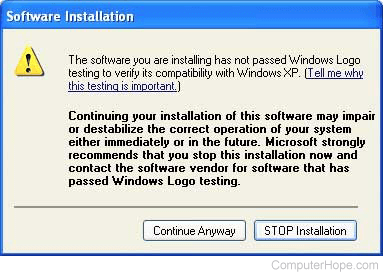
Below is an example of the full error message this document relates to as given in Microsoft Windows XP.

The software you are installing for this hardware:

<device/driver name>

has not passed Windows Logo testing to verify its compatibility with Windows XP. (Tell me why this testing is important.)

Continuing your installation of this software may impair or destabilize the correct operating of your system either immediately or in the future. Microsoft strongly recommends that you stop this installation now and contact the hardware vendor for software that has passed Windows Logo testing.

This document can also help users who are encountering a similar error in earlier versions of Microsoft Windows such as Microsoft Windows 2000.

The Microsoft digital signature affirms that software has been tested with Windows and that the software has not been altered since it was tested.

The software you are about to install does not contain a Microsoft digital signature. Therefore, there is no guarantee that this software works correctly with Windows

<device/driver name>

If you want to search for Microsoft digitally signed software, visit the Windows Update Web site at http://windowsupdate.microsoft.com to see if one is available.

Do you want to continue the installation?

Solution:

Microsoft has developed these tests as a means to help prevent errors with Windows and hardware related drivers that are installed onto it. When you encounter this error it is a good indication that the driver or one of the files associated with the driver you're installing is either not designed for the version of Windows you are using or has not been properly created.

Before installing the file it is highly recommended that you first verify that there is not a more up-to-date driver for your device. A listing of hardware manufacturer driver pages can be found on our driver page.

If you're installing the latest driver or your hardware manufacturer has not released any updated drivers you can still install the out-of-date drivers. However, realize that errors could arise immediately or in the future because of the out-of date drivers.

Finally, if the drivers do not work contact your hardware or computer manufacturer to see if any updated drivers have been released and/or if not yet released when they will be released. Contact information for all major computer and hardware manufacturers can be found on our third-party contact page.


Index


Category:
Drivers

Companies:
Microsoft

Related Pages:


Resolved

Were you able to locate the answer to your questions?

Home - Computer help - Contact - Dictionary - Links
Link to Computer Hope - Bookmark Computer Hope