
How to change, disable, or enable Windows event sounds
Event sounds (e.g., chimes, beeps, buzzes) notify you of an occurrence in Microsoft Windows. For example, when you press an invalid key in a program, connect a new device to your computer, or when an error occurs.
The settings for these event sounds are controlled through the Sound Properties section of the Control Panel. To adjust the sound settings for these notifications, follow the steps below.
Changing or disabling sounds using the instructions below only affects sounds relating to Windows functionality. Software and game sounds are controlled through the program itself and are not affected by changing or disabling Windows event sounds.
Some sounds like basic beeps are generated by the internal speaker and cannot be changed using the following steps.
Disable or change individual sounds
Follow these steps to disable or change specific system sounds in Windows.
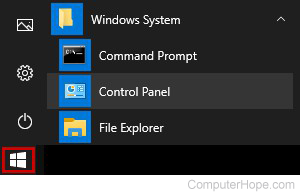
- Press the Windows key, type Control Panel, and press Enter.
Or, open the Windows 10 Start menu, and choose Windows System > Control Panel.
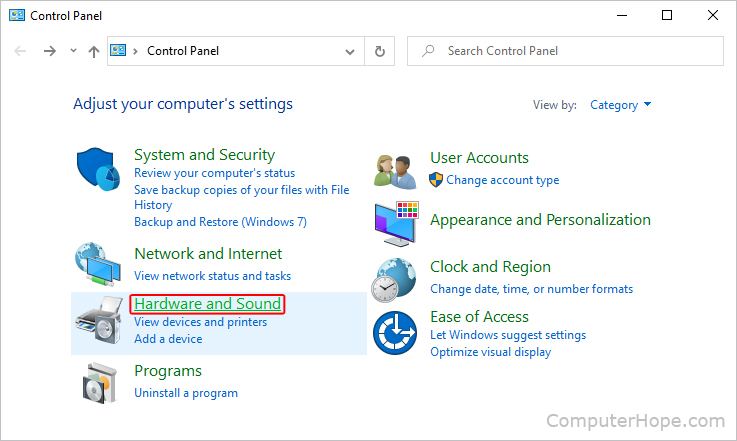
- In the Control Panel, click Hardware and Sound.
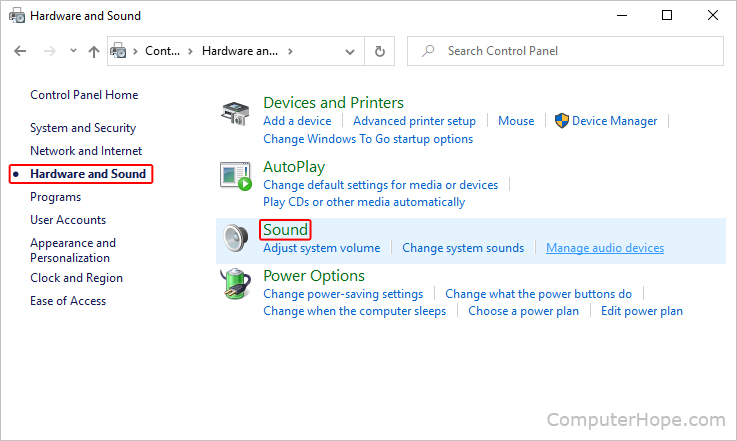
- Make sure that the Hardware and Sound tab on the left is selected, then click Sound near the center portion of the screen.
- In the Sound window, click the Sounds tab.
- In the Program Events section, locate the sound you'd like to disable or change in the drop-down list under the Sounds subsection. Select (None) to disable the sound or select a different sound file to change it.
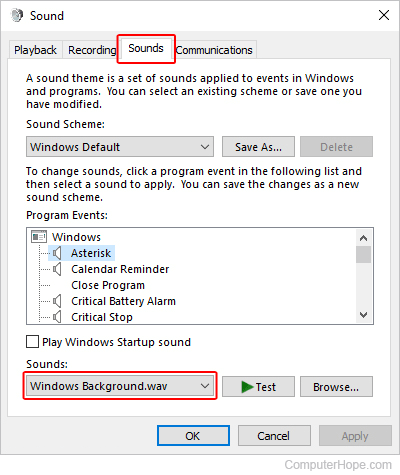
- Once you've made a selection, click
 and click the
  button.
Disable or change all sounds
Follow these steps to disable or modify all system sounds in Windows.
- Press the Windows key, type Control Panel, and press Enter.
- In the new window, click Hardware and Sound.
- Make sure that the Hardware and Sound tab on the left is selected, then click Sound near the center portion of the screen.
- In the Sound window, click the Sounds tab.
- Expand the drop-down list under the Sound Scheme section. Select (None) to disable all program event sounds or choose a different or default scheme.
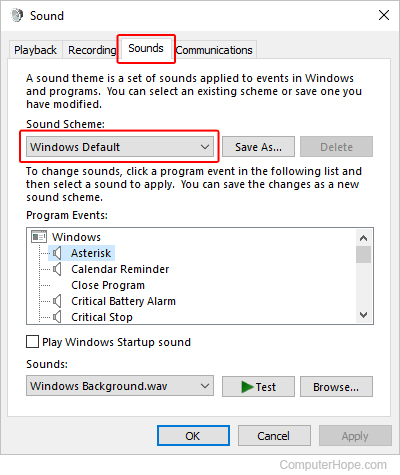
- Once you've made a selection, click and click the button.