
How to tell if a case fan is sucking or blowing air
Updated: 12/30/2019 by Computer Hope
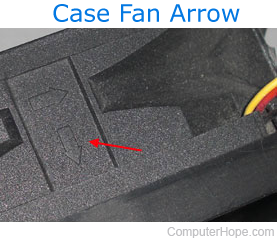
Many computer case fans today have a small arrow on one of the sides to indicate the direction the fan is moving air. The red arrow in the image points to an example of these markers.
What if I can't see them?
Unfortunately, not all case fans have these arrows, so it requires some additional investigation on your part to locate them. Alternatively, you can plug the fan in and place a tissue on a side of the fan to determine the direction of air flow.
How can I change a fan from suck to blow?
To change the direction of the air moving through a fan, you can take out the screws, and then flip the fan over. Doing so lets you reinstall it facing the opposite direction, thus changing whether it is "sucking" or "blowing" air.