
How to connect a PS/2 mouse and keyboard to a laptop
Updated: 04/12/2021 by Computer Hope
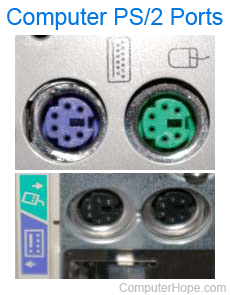
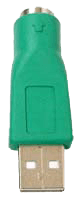
Today's laptops and desktop computers rarely, if ever, have a PS/2 port for connecting an external mouse or keyboard. However, all computers have one or more USB (universal serial bus) ports. If you have a mouse with a PS/2 cable, a simple PS/2-to-USB adapter can be purchased. Below is a picture of a PS/2-to-USB adapter.
Note
If you need a PS/2-to-USB adapter for a keyboard or mouse, we suggest getting a PS/2-to-USB converter with mouse and keyboard connections. Many of the cheap PS/2-to-USB adapters are passive adapters and only work with a mouse and not a keyboard.
If your mouse and keyboard has any extra functionality or drivers included with it, these may not work when using a PS/2-to-USB adapter.