
Drop-down menu
In a computer GUI (graphical user interface), a drop-down menu is a menu that offers a list of options. The title of the menu, or the currently-selected item in the list, is always displayed. When the visible item is clicked, other items from the list "drop-down" are shown, and the user can choose from those options.
A drop-down menu may also be called a drop-down list or droplist.
For example, many programs have a "File" drop-down menu at the top-left of their screen. Clicking the "File" text generates a new menu with additional options.
Drop-down menus in HTML
A drop-down menu is a clean method of showing a large list of choices since only one choice is displayed initially until the user activates the drop-down box. To add a drop-down menu to a web page, use a <select> element. The <option> element with attribute selected="selected" is the default option displayed before the menu is opened.
Select a Choice:
<select name="example">
 <option selected="selected" value="one">Choice 1</option>
 <option value="two">Choice 2</option>
 <option value="three">Choice 3</option>
</select>
In this example, we have also assigned a value to each option. These values can be passed to any server-side script for information to be logged or for actions to occur based on the values.
Example of the above code
Nothing happens when selecting a choice using the drop-down menu above. To submit data using a drop-down menu, use our customer service form.
Drop-down menu in Google Docs
A drop-down menu can be added to a Google Docs by typing @ (at sign) to access the smart chips menu. From this menu you can insert an interactive drop-down menu in your document.
Drop-down menus in a program window
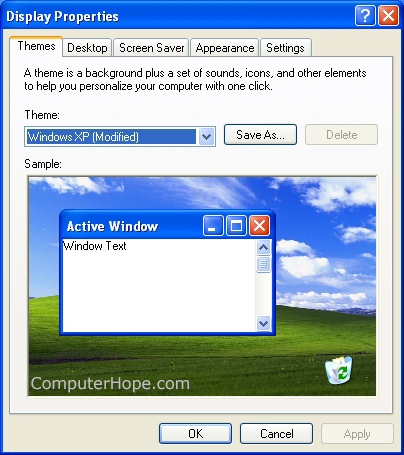
Drop-down menus are used in all types of software. For example, in the Windows operating system, the list of possible display themes (shown below) is a drop-down menu.
How to select a drop-down menu using the keyboard
To select a drop-down menu using the keyboard, press Tab until the drop-down menu is selected. Once selected, use the up and down arrow keys to scroll through the available options. For example, press Tab now until the following drop-down menu is selected, and then use your down arrow key to scroll through the list. Once an option is selected, press Tab again to move to the next item or press Enter.
Alternatively, press the first letter of an option. For example, in the drop-down menu above, "Last" is the last item in the drop-down menu. If you press the "L" key on your keyboard once the drop-down menu is selected, it scrolls down to that option. This tip is helpful for large drop-down menus with several options (e.g., selecting a state or country).
What key do I press to close a drop-down menu?
Press the Esc key to close the drop-down menu.
What happens when you click an item in a drop-down menu?
When an item in a drop-down menu is clicked, it becomes the selected option. For example, filling out a form containing a drop-down menu with a list of countries and choosing "United States," becomes your selection. When you submit the form, "United States" is your chosen country.
What icon do you click to activate a drop-down menu?
If a drop-down menu has only one option (as seen below), click the down arrow icon next to the first option.
Today, most programs also allow you to click anywhere in the drop-down menu to see the list of available options.
How to select multiple choices in a drop-down
Drop-down menus that hide all options until the down arrow is clicked (like the example below) only allow one option to be selected.
If you're the web developer and want to allow the visitor to select multiple options, add the multiple attribute to the select tag. For example, below is the same drop-down menu with the multiple attribute added.
When a drop-down menu displays multiple options, as shown above, hold down Ctrl and click multiple options to submit.
If your drop-down menu has too many options, add the size attribute in the select tag.
Should I use "drop-down menu" or "dropdown menu" in writing?
When writing documentation or describing a drop-down menu, use "drop-down menu" unless you're describing a function, option, or command with no hyphen.
Combo box, List box, Menu, Menu-driven, Operating system terms, Spin box