
Floating toolbar
A floating toolbar is a toolbar that is movable around the screen, unlike a traditional toolbar that is fixed in one place. The steps to create a floating toolbar vary depending on the program. However, it's often created by clicking and holding the toolbar's indentation on the far left of the toolbar and dragging the bar.
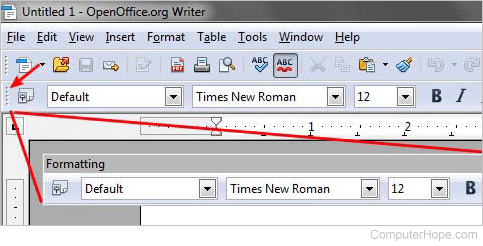
As seen in the example image above, in OpenOffice Writer, you click the indentation marked by the arrow. While continuing to hold down the mouse button, drag the indentation mark away from the top of the screen. If you want a fixed toolbar, click the toolbar title bar and drag it back to the top portion of the window.
You can also drag a toolbar to the left, right, or bottom of the screen to have the toolbar attach itself there.