
Move
Move may refer to any of the following:
1. With computers, to move is to permanently transfer text, data, or files from one location to another without duplicating them. Most find it easiest to move something on a computer using cut and paste.
How to move text
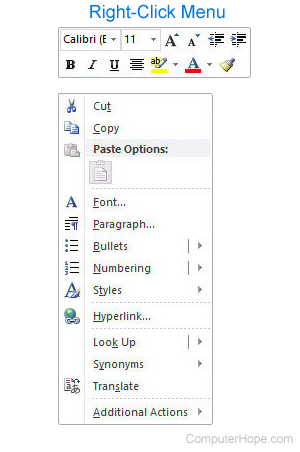
Highlight the text you want to move and then right-click the highlighted text with your mouse to get a right-click menu similar to the example shown in the picture.
From the right-click menu, select Cut to move the text to your clipboard. Once the text is cut, right-click where you want to move (paste) the text and select Paste.
Practice moving text
Using the two text fields below, try cutting the text in the first box and pasting it into the second box. If done successfully, the "Example text to cut" should be moved from the first text field to the second text field. If you copy instead of cut, "Example text to cut" would be in both text fields.
How is moving different than copying?
In general, to move something is to relocate it from one place to another. Its position is changed: after it's moved, the thing no longer exists in its previous location. However, when you copy a thing, the thing is not moved or changed in any way. It's unmodified, and a new thing — a copy of it — is created.
In your operating system, when you move a file to another location on the same volume, the contents don't change and are (usually) not relocated. Only the file name and path, which point to that data, are modified. For this reason, moving a file on the same volume is generally a very fast operation.
If a file is copied, the new file does not share data with the original file. A new copy of the file's data is written to disk. For this reason, copying a file is slower than moving it to a location on the same volume.
If a file is moved to another volume, where its contents don't exist, the entire file's contents must be written to the destination volume. For this reason, moving a file to another volume takes about the same time as making a copy.
2. Move describes moving an object from one place to another on the screen. For example, to move an icon on your desktop, click and hold the left mouse button on the icon. Then, while holding the mouse button, drag it to another location, and release the button.
Often, moving an object is done using the mouse, but it can also be done using the keyboard. For example, with a non-maximized window in Windows, press Alt+Spacebar to open the window menu, then use the Down Arrow to arrow down to Move and press Enter. Once selected, you can use the arrow keys to move the window to a different position. Once the window is in the desired location, pressing Enter moves the window to the new position on the screen.
3. In a command line, move describes changing the current location. For example, if your current directory or path is C:\Windows> and you want to move into the C:\Windows\System> directory, you'd type "cd system" at the prompt. For all versions of a command line, the cd (change directory) command moves you from your current directory.

4. In Adobe Photoshop, the Move tool allows the users to move text, layers, and other objects around in a picture. The Move tool icon is represented by four arrows pointing up, down, left, and right, as shown in the picture.