
Path
A path may refer to any of the following:
1. Alternatively known as the pathname, the current path or path is the complete location or name of where a computer, file, device, or web page is located. Below are examples of different types of computer-related paths.
MS-DOS path
The following example shows an MS-DOS path or file path for system.ini file. When working with an MS-DOS, Windows, or Windows command line path, the drives (root), directories, and files are all separated by a backslash.
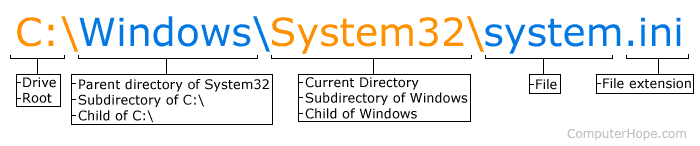
Linux and Apple path
In a Linux or an Apple shell using the pwd command, your path may look like the following example. When working with this path, directories and files are all separated by a forward slash.
/home/hope/public_html/
Network path
A network path is a path to a share. In the example below, "help" is the share on the "hope" computer.
\\hope\help
Internet path
The following example shows the Internet path or URL (uniform resource locator) to this web page on the Internet.
https://www.computerhope.com/jargon/p/path.htm
How do I display the current path?
By default, MS-DOS and the Windows command line show the full current path in the prompt. For example, if the prompt is C:\Windows\System32>, then c:\Windows\System32 is the path. With Linux, you may only have a partial path. For example, the prompt may have "~/public_html/cgi-bin" in the prompt. The ~ (tilde) is a shortcut to express your home directory.
To display the current path in MS-DOS or the Windows command line, type chdir at the prompt. Type pwd at the prompt in Linux to print the working directory (path).
- See the chdir command page for further information on this command.
- See the pwd command for further information and examples on this command.
How to display the path in Windows?
In Windows, the path is displayed in the top bar of Windows Explorer when browsing files.
Clicking the path bar in Explorer displays the command line path. For example, if the Explorer bar shows a folder that says "This PC > OS (C:) > ch," clicking in the bar would give the command line path of "C:\ch."
To view the path of a file or folder in Windows, right-click the file or folder and select Properties. In the Properties window, the path is shown in the "Target" or "Location," depending on your version of Windows.
If you frequently need to see the full path in Explorer, open Explorer's Folder Options and select the View tab. Here, you can check the option "Display the full path in the title bar" to have the path always shown in the title bar.
2. Path is a social networking service founded in 2010 exclusive to mobile devices. It let you connect with your closest friends and family, up to 150 connections. The service shut down on October 18, 2018.
3. In vector graphics, a path is another name for a vector or line with a start and end point.
4. With computer games and other 3-D environments, a path is the line objects take to get from one point to another. For example, in a computer game, an NPC (non-player character) may follow a set path to give the illusion of a living character. To help that character navigate around obstacles that may impede their path, an algorithm like the A* algorithm may be used.
Absolute path, Access path, Command line, Current directory, Data path, Directory, Relative path, Software terms, UNC