
Quick Launch
Updated: 08/02/2020 by Computer Hope
Quick Launch is a section of the Microsoft Windows taskbar that lets a user launch programs without having to locate them using the Start menu. The Quick Launch area is next to the Start button.
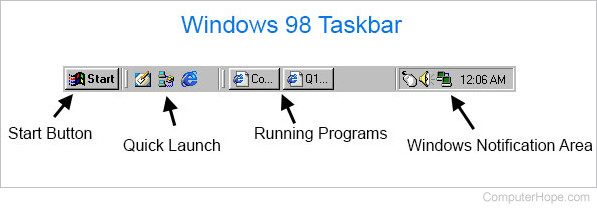
This feature was introduced with the release of Microsoft Windows 98. The image below shows an example with three Quick Launch icons in-between the Start button and currently-running programs. On the far right of the taskbar is the Windows Notification Area.
With Windows Vista, 7, 8, and 10, Microsoft has moved icons open programs and the Quick Launch shortcuts into the same area. Quick Launch programs are now "pinned" to the taskbar.
