
Computer quizzes

Below is a complete listing of all of the Computer Hope computer-related quizzes with answers. To test yourself without seeing the answers, click the "take the full computer quiz" link.
Computer quizzes with answers
What does the term MIME stand for?
1. Mail Internet Mail Exchange
2. Mail Interleave Method Exchange
3. Multipurpose Internet Mail Extensions
4. Multipurpose Interleave Mail Exchange
Mime stands for Multipurpose Internet Mail Extensions, a standard format for attaching non-text files, such as graphics and other files to a text base electronic mail message.
The Intel Pentium bug/flaw was an issue with the:
1. Cache
2. FPU
3. Socket
4. There was no bug/flaw
The Intel Pentium bug/flaw was an issue with the FPU, a section of the processor allowing the computer to perform floating-point calculations. While this issue was very small and only occurred on earlier Intel Pentium processors, there was wide coverage of this issue and several thousand processors ended up being replaced.
What does the term IRQ stand for?
1. Input Request Queue
2. Interrupt Request Queue
3. Interrupt ReQuest
4. Input ReQuest
IRQ stands for Interrupt ReQuest. An IRQ is a hardware signal sent to a microprocessor which temporarily stops (interrupts) the current running process, so another process can run. It's frequently used for event handling. For instance, when you type on the keyboard, an IRQ may be sent, interrupting whatever programming you're running so another process can handle the new keystroke data. Processors that use the x86 architecture often have 16 IRQs. Newer systems using Intel APIC have 24 IRQs. For additional information, see our understanding system resources guide.
A cathode ray tube is found in what?
1. CPU
2. Printer
3. Monitor
4. Scanner
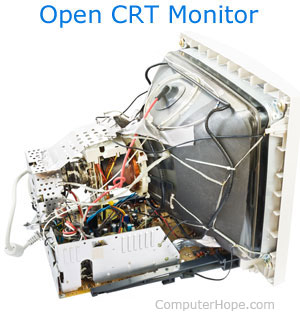
A cathode ray tube, commonly called a CRT, is found in a computer monitor. The CRT is the main component and most expensive part in your computer monitor. In the CRT are three electron guns: red, green, and blue. Each of these guns streams a steady flow of electrons left to right for each line of your monitor. As the electrons hit the phosphors on the CRT, the phosphor will glow certain intensities. As a new line begins, the guns will the left and continue right. This process may repeat hundreds or thousands of times, until all lines on the screen are completely drawn. Once the phosphors on the CRT are hit with an electron they only glow for a short time. Because of this, the CRT image must be refreshed many times a second.
A CPU stands for what?
1. Central Power Unit
2. Certified Public Unit
3. Central Processing Unit
4. Certified Power Unit
The CPU, or the Central Processing Unit, is the brain of the computer and the single most important chip in the computer. Modern processors contain millions of transistors etched onto tiny square silicon called a die, which is about the with of a standard thumb. The CPU performs the system's calculating and processing. Most personal computers included the Intel processors. Intel released the first processor, the 4004, in 1971. Today, the market is being shared by other companies such as the popular AMD processor manufactured by the AMD company.
A Computer Virus cannot be contracted by...
1. Floppy diskette
2. E-mail
3. Scanner
4. Internet Downloads

Computer viruses cannot be contracted through an optical scanner. While the hardware scanner inputs data from hard copies or other data sources, a virus cannot transfer through a scanner as the input is placed into an image format. For additional information on computer viruses, see our virus section.
What is degauss?
1. Attachment for CPU
2. Creating magnetic media
3. Erasing magnetic media
4. Medical software
Term derived from Johann Gauss who was a mathematician that studied and worked with electro-magnetic fields. Degauss is a method of erasing magnetic media and the removal of remnants of previously recorded signals. The degauss process is achieved by passing magnetic media through a magnet field more powerful than the media itself to rearrange the magnetic particles.
Update: Michael B., a visitor of Computer Hope, also indicated that degaussing was first used by the British Royal Navy in the 2nd World War. An electromagnetic cable was inserted on the inside and around each warship as a safeguard against magnetic mines. Each time a ship came into harbor it was degaussed. An electrical current was passed through this cable, neutralizing the ship's magnetic field, making magnetic mines useless.
When degaussing a monitor the degauss demagnetizes the CRT, fixing possible color impurities. After either the degauss button is pressed or the monitor is manually degaussed, the degaussing circuit will be activated and then deactivated after a few seconds. Older monitors may not have this ability; however, handheld monitor degauss can also be used to restore color impurities.
What is a cookie?
1. Cooking software
2. Website
3. Internet information file
4. Hacker file
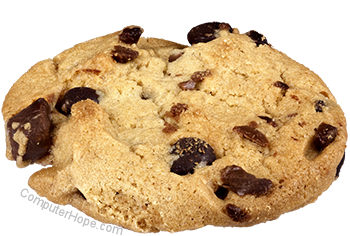
A cookie, in short, is an Internet file. The complete definition of a computer cookie is an HTTP header consisting of a text-only string that gets entered into the memory of your browser. This string contains the domain, path, lifetime, and value of a variable you set. If the variable's lifetime is longer than the time the user spends at your site, then this string is saved to file for future reference.
Many believe that computer cookies are dangerous and are a privacy concern. However, cookies are stored on your computer hard disk drive and only accessible by the page it was created or the computer user. Some examples of how computer cookies help you are:
- Store on the hard disk drive your information and preferences for a website, such as an Internet store. This information can only be accessed by that store, and is used to help direct you faster to places that most interest you.
- Store information about your preferences for a start page. If you use a customized start page containing information, like local weather and news, this information is placed on the web page by looking at information from a cookie.
The above are a few examples of computer cookies, to help understand what they are and how they're used.

What is downloading?
1. Sending a file on the Internet
2. Retrieving a file on the Internet
3. Moving a file from a floppy
4. Scanning a picture
Downloading is the method of getting a file from another computer. The opposite of downloading a file is uploading a file, where a user sends a file to another computer.
When on the Internet, you are actually downloading to your computer's hard disk drive each page you view. Also, when getting software, such as a software update or patch, you are also downloading a file to the computer.
When downloading a file, it is important to remember where the file is copied to on your hard disk drive. If this is not known, you may have a difficult time locating the file and running it to have it do its specific task.
What is the capacity of a standard PC floppy?
1. 2 MB
2. 1.44 K
3. 1.44 MB
4. 120 MB
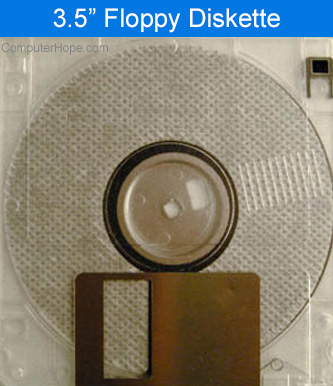
A standard PC floppy, once formatted, can hold 1.44 MB. Because of this small capacity by today's standards, a floppy diskette and floppy drive are rarely used. Subsequent floppy technologies such as LS-120 superdisk achieved much greater capacities (up to 240 MB), while still being backward-compatible with standard 1.44 MB floppy diskettes.
Which command lists files in MS-DOS?
The command dir, short for directory, lists files in MS-DOS and the Windows command line. Not to be confused with the command ls that is generally used to list files in Unix variants.
Which of the following is not an image file?
Each of the listed file types are valid file extensions. However, the file extension TMP is not an image file. TMP, or temp files, are temporary Windows files used to store temporary data or be used as a backup for files that are being used.
Why was the first Intel Celeron processor not as popular as expected?
1. Had errors
2. No level 2 cache
3. Caused errors
4. Caused Excess heat
The original Intel Celeron processor was not as popular as expected because it lacked level 2 cache to help reduce the price of the processor. With no level 2 cache, the processor was much slower than the competitor processors. Users felt that, while the processor was cheap, it was not worth the dramatic speed decrease.
The Windows registry consists of which two files?
1. autoexec.bat and config.sys
2. user.dat and win.ini
3. user.dat and system.dat
4. win.reg and user.dat
The system registry consists of two files named the user.dat and system.dat. These two files have backups named user.da0 and system.da0. Additional information about the system registry is available on our registry page.
Unix is short for what?
1. UNIt eXchange
2. UNIform eXchange
3. UNIt X
4. It is not an acronym
Unix is not an acronym, so technically, it's not short for anything. However, an early version of Unix was called UNICS, which was short for UNiplexed Information and Computing Service. Additional information about Unix is available on our Unix page. Unix history is available on our Unix history page.
Microsoft Windows XP is an upcoming operating system, what is XP short for?
1. Whistler
2. eXtra Powerful
3. eXPerienced
4. It is not an acronym
Code-named Whistler, Microsoft Windows XP is sort for Windows Experienced. Windows XP is currently in Beta and will be released the second half of 2001.
A traditional hard disk drive employs what technology as a storage mechanism?
1. Laser
2. Magnetic
3. Light
4. Chemical
A traditional hard disk drive utilizes a magnetic technology to read, write, and store information. Further information about hard disk drives is available on our hard drive page.
Which of the following is not a network command?
1. Ping
2. Winipcfg
3. Netcfg
4. Tracert
The command netcfg is not a network command. All other options are valid commands dealing with computer networks.
Which of the following is not an Internet browser?
1. Internet Explorer
2. AOL
3. Netscape
4. Opera
The correct answer is AOL, it is an ISP (Internet Service Provider) and not an Internet browser. Internet Explorer, Netscape, and Opera are all types of Internet browsers available for various platforms.
Which of the following is a broadband Internet connection?
1. 28.8 k
2. 56k
3. Cable
4. Modem
The correct answer is cable, as it is one of the many broadband possibilities available in some areas of the world. 28.8 k, 56k, and Modem are all types of modems. Additional information about modems is available on our Modem help and support page.
Which of the following is not an operating system?
The correct answer is OSD, which is not related to a computer operating system. See the SuSE, Unix, and DOS pages for further information about these operating systems.
Which of the following file extensions is not an audio file format?
The correct answer is COM. A com file is a compiled executable file and not an audio file format file. See our file extensions page for further information about file extensions including each of the above mentioned audio file extensions.
Which of the following is a PC video file extension?
1. .MVE
2. .MP3
3. .AVI
4. .VDO
The correct answer for this question is number three, or .AVI. AVI is a Microsoft Windows movie file and is commonly used for short movies. Today, AVI is being replaced with more compressed file formats, like MP4 and WMA.
Which of the following is not a Unix or Linux variant
1. SunOS
2. RedHat
3. DOS
4. Debian
The correct answer for this question is number three. DOS, also known as MS-DOS, is not a variant of Unix or Linux. Additional information about MS-DOS is available on our MS-DOS page. Additional information about Unix, Linux, and its variants is available on our Unix page.
Which of the following is not a network device?
1. Core
2. Switch
3. Hub
4. Router
The correct answer for this question is number one. Core is not a network device. Find the definition for any of the terms above by clicking any of the following links: core, hub, router or switch.
Which of the following is part of a hard drive?
1. Motherboard
2. Platter
3. Laser
4. Riser Board
The correct answer for this question is number two. A platter is the portion of a hard drive of where information is written. Additional information about the computer hard disk drive is available on our hard drive page.
Which of the following is not related to e-mail?
The correct answer for this question is number three. See BCC definition, SPAM definition, and Pine information for additional information about each of these.
Which of the following is not a programming language?
1. Lisp
2. See
3. Java
4. Perl
The correct answer for this question is number two. Not to be confused with C, see is not a programming language. See Lisp, Java, and Perl for additional information about each of these programming languages.
Which of the following is not a mouse technology?
1. Mechanical
2. Optical
3. Motorized
4. Optical-Mechanical
The correct answer for this question is number three. See the mouse definition for further information about mechanical, optical, and optical-mechanical mice.
What was the latest stand alone version of MS-DOS?
1. MS-DOS 6.0
2. MS-DOS 6.22
3. MS-DOS 95
4. MS-DOS 6.2
The correct answer for this question is number two. MS-DOS is available in versions 2.0x through 6.22. Some may be under the impression that MS-DOS 7.0 is the latest version of MS-DOS. Windows 95 included MS-DOS 7.0; however, this was not a stand-alone version of MS-DOS and cannot be purchased by itself.
What is IRC?
1. Internet Relay Channel
2. Internet Respond Channel
3. Internet Relay Chat
4. Internet Response Cache
The correct answer for this question is three. IRC, or Internet Relay Chat, is a popular method of chatting and sharing software. Additional information with IRC is available on our IRC definition.
Which of the following will not help your computer's security?
1. Firewall
2. VLAN
3. Good Password
4. Updated software
The correct answer for this question is a VLAN. A firewall, good password and updated software are all good steps in keeping your computers secure.

Which of the following is an example of Binary?
1. 123
2. 111 1011
3. 7B
4. All of the above
The correct answer for this question is number two. For additional information about binary, see the dictionary binary definition.
Which of the following is currently a hard drive manufacturer?
1. Dell
2. Microsoft
3. Conner
4. Seagate
The correct answer for this question is number four. Although Conner manufactured hard drives in the past, Seagate is the only company in this list of options that still manufactures hard drives.
Which video resolution is not correct?
1. 640 x 480
2. 800 x 680
3. 1024 x 768
4. 1152 x 864
The correct answer for this question is number two. 800 x 680 is not a valid monitor resolution. Additional information and help with monitor resolutions is available on our video card help and support page.
Which of the following is not a network protocol?
The correct answer for this question is number four. PSI is not a type of network protocol. Further information about network protocols is found on our protocol definition.
Which of the below formulas add cells a1 through a5 in Microsoft Excel?
1. =sum(A1+A5)
2. =sum(A1:A5)
3. =add(A1+A5)
4. =total(A1:A5)
The correct answer for this question is number two. When using the colon, this allows a formula to perform the function for A1 through A5. However, when using a single plus symbol, this only adds the two cells together. Additional information and help with Excel is available on our Microsoft Excel page.
Which of the following is the directory commonly used to store a website?
1. /home
2. /public
3. /home_html
4. /public_html
The correct answer for this question is number four. The /public_html directory is the directory commonly used on Sun Solaris boxes, *nix boxes, and other platforms to store each user's website on that computer. While it's also possible for this directory to be anything, it's common for web hosting services to store web pages and website information in the /public_html directory.
Which of the following is not a keyboard layout?
1. QWERTY
2. Maltron
3. Sholes
4. Dvorak
The correct answer for this question is number three. Although Sholes did develop the QWERTY keyboard layout, it is not the name of the layout. Additional information about computer keyboards is available on our keyboard page.
Which of the following is not related to programming?
1. Subroutine
2. Compile
3. Null pointer
4. Interleave
The correct answer for this question is number four. See the subroutine, compile, null pointer, or interleave definitions for the meanings of each of these terms. See our programming terms for a full list of all terms relating to computer programming.
Which Linux command sets a file's permission?
1. attrib
2. chmod
3. properties
4. rights
The correct answer for this question is number two. See our Linux chmod command page for further information about this command.
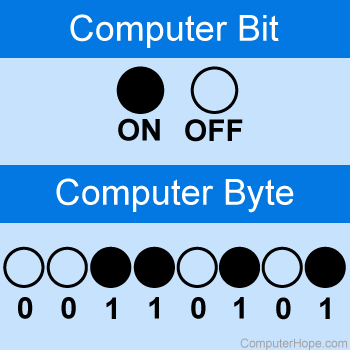
How many bits in a byte?
The correct answer for this question is number four. There are eight bits in a byte.
Which of the following is not a search engine?
1. Google
2. Zeal
3. Amazon
4. Hotbot
The correct answer for this question is number three. Although Amazon is a real site, it is not a search engine.
Which of the following was the first Intel processor introduced?
1. 3080
2. 4004
3. 8080
4. 8086
The correct answer for this question is number two. The Intel 4004, introduced in 1970, was the first processor introduced by Intel.
IP is an abbreviation for which of the following?
1. Internet Printer
2. Internet Ping
3. Internet Person
4. Internet Protocol
The correct answer for this question is number four. See the IP dictionary definition for further information and examples about this term.
Which of the following is not related to a computer hard drive?
1. Platter
2. Pwrite
3. Access Arm
4. MFM
The correct answer for this question is number two. See the platter, pwrite, access arm, and MFM dictionary definition for additional information about each of these terms.
Which of the following file systems or file allocation tables did Windows 95 not provide?
1. NTFS
2. ext3
3. HPFS
4. All of the above
The correct answer for this question is number four. Microsoft Windows 95 only provided support for FAT16 and later versions supported FAT32. Support for NTFS and HPFS were introduced or available in later versions of Microsoft Windows.
How many bits are in a megabit?
1. 1000000
2. 1024
3. 256
4. 8
The correct answer for this question is one. There are 1,000,000 bits in a megabit.
Which of the following commands displays the time on most Linux and Unix computers?
1. time
2. date
3. timex
4. now
The correct answer for this question is number two. The time command is used to time a command and not display the time. To display the time and date, users must use the date command. Users who may come from an MS-DOS environment may have difficulties with this little difference at first.
Which of the following is not considered a superuser?
1. Admin
2. Agent
3. Op
4. Root
The correct answer for this question is number two. See each of the following definitions for additional information about each of these terms: admin, agent, op, and root.
Which of the following is not related to chat?
1. IRC
2. IM
3. Op
4. AutoPlay
The correct answer for this question is number four. See each of the following definitions for additional information about each of these terms. IRC, IM, Op, and AutoPlay.
How many keys are there on the majority of the standard US keyboard today?
1. 100
2. 102
3. 104
4. 106
The correct answer for this question is number three. Although many US computer keyboards also have 101 keys, with the advent of the 104-key keyboard with the Microsoft Windows keys, most computers are using a 104-key keyboard. See the 101-key keyboard definition and 104-key keyboard definition for further information.
Which of the following is not related to computer video.
1. DirectX
2. AC-3
3. GeForce
4. OpenGL
The correct answer for this question is number two. AC-3 is related to sound and not computer video. See any of the following definitions for additional information about each of these terms: DirectX, AC-3, GeForce, and OpenGL.
Which of the below is related to memory?
1. PS
2. DSP
3. Flops
4. Cache
The correct answer for this question is number four. Cache is related to memory while all other definitions are not. See the following definitions for additional information about each of these terms: PS, DSP, flops, and cache.
How many pins is an IDE/EIDE connector?
1. 20-pin
2. 25-pin
3. 40-pin
4. 50-pin
The correct answer for this question is number three. The IDE/EIDE connector is a forty-pin connector and is one of the most widely used type of connectors used on IBM compatible computers.
Which of the below is not a type of DVD drive?
1. DVD-RD
2. DVD-RW
3. DVD+RW
4. DVD-RAM
The correct answer for this question is number one. DVD-RW, DVD+RW, and DVD-RAM are all types of DVD drives.
Which of the below is not related to power?
The correct answer for this question is number one. Surge, UPS, and VRM are all related to power. Where PIO is not related to power.
Which of the below is an input device?
1. Monitor
2. Printer
3. Scanner
4. Speakers
The correct answer for this question is number three. A computer scanner is one of the many ways to input data into a computer. A monitor, printer, and speakers are all examples of output devices.
Which of the below is not a type of live communication?
1. Chat
2. E-mail
3. Instant Messaging
4. IRC
The correct answer for this question is number two. Often e-mail can take several minutes, hours, or even days to be read or get a response. Chat, instant messaging, and IRC are all forms of live communication in most situations.
Which of the below does cannot allow a user to communicate with another computer?
1. Network card
2. Serial port
3. VGA port
4. Modem
The correct answer for this question is number three. A network card, serial port, and modem all are hardware devices that allow a user to communicate with another computer. A VGA port, however, only allows the computer to communicate with a computer monitor.
Which of the below is not a text editor?
The correct answer for this question is number two, Perl is a programming language and not a text editor. See the Vim, Perl, Pico, and Vi dictionary definitions for additional information.
How many keys does the standard Windows US keyboard with number pad have?
With the three Microsoft Windows keys, function keys, and the keys found on the number pad the standard Windows US keyboard has 104 keys. Keyboards for different places in the world and with additional features such as media buttons may have more or less keys.
Which below file extension is not a type of compressed file?
The correct answer for this quiz is number three. The .tar file extension is not a type of compressed file, it is an archive file created by the tar utility. Additional information about each of the above file extensions and hundreds of other file extensions is available on our file extension section.
Which of the below is not a type of network?
The correct answer is number three. An LPN is not a type of network. See the MAN, HAN, and VPN dictionary definitions for additional information about each of these terms.
Which of the below is a type of memory that cannot have information written to it?
The correct answer for this question is number three. ROM, short for read-only memory, is a type of memory that cannot have information written to it. See the DRAM, RAM, ROM, and SRAM dictionary definitions for additional information about each of these terms.
Which of the below is not a type of game?
The correct answer for this question is number four, ETS is not a type of game. However, FPS, RTS, and RPG are all types of games.
What is another name for a motherboard?
1. CPU
2. Fatherboard
3. Main system
4. System board
The correct answer for this question is number four. A system board is another name for a computer motherboard. See the motherboard definition for additional information about this term and other common names for it.
Which year was Microsoft Windows XP released?
1. 2000
2. 2001
3. 2002
4. 2003
The correct answer for this question is number two. Microsoft Windows XP was released on October 25, 2001. Additional history on Microsoft Windows is found on our Windows history page.
Which of the below is not a type of printer?
1. Bubble Jet printer
2. LED printer
3. Thermal printer
4. Microwave printer
The correct answer for this question is number four. See bubble jet printer, LED printer, and thermal printer definitions for further information about each of these printers.
Which of the below people is credited for developing the World Wide Web?
1. Alan Kay
2. Tim Berners-Lee
3. Jack Kilby
4. Robert Noyce
The correct answer for this question is number two. Tim Berners-Lee is credited for developing the Internet.
What is the maximum transfer speed of the wireless 802.11a standard?
1. 100 MBps
2. 54 MBps
3. 24 MBps
4. 10 MBps
The correct answer for this question is number two. 54 MBps is the maximum transfer speed of this standard. See the 802.11 standard page for a listing of each of the standards and their capabilities.
Which of the below HTML tags is correct for inserting an image?
1. <a img="">
2. <img src="">
3. <image source="">
4. <image="">
The correct answer for this question is number two. The img src tag is the correct tag to insert images into an HTML document. Additional information about HTML and HTML tags is available on our HTML help page.
What is the .tbz file extension?
1. Compressed text file
2. Text file
3. Audio file
4. Compressed tar file
The correct answer for this question is number four. A .tbz file is a tar file that is compressed using bzip.
Which of the below is not a network connectors?
1. DVI
2. RJ-45
3. BNC
4. DB-15
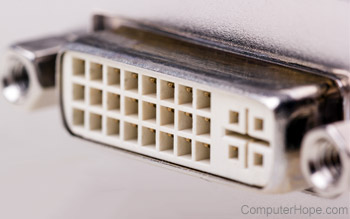
The correct answer for this quiz is number one. A Digital Visual Interface (DVI) is a connector used to interface with a display device such as a monitor.
Who developed the Apple I?
1. Bill Gates
2. Bill Jobs
3. Steve Palmer
4. Steve Wozniak

The correct answer for this quiz is number four. Steve Wozniak is responsible for developing the Apple I. With the help of Steve Jobs, Wozniak helped form the Apple computer company we know today.
Which of the below is not a PC game?
1. Dune
2. Oregon trail
3. Tropico
4. Defendex
The correct answer for this quiz is number four. Defendex is a game name we made up. Dune, Oregon trail, and Tropico are all PC games.
What command comments out a line in a batch file?
The correct answer for this quiz is number four. Anytime you want to create a remark in a batch file, REM must be added in front of the line. Remarks are often used to skip a line in the batch file or make comments.
Which of the below is not an e-mail client?
1. Eudora
2. Opera
3. Outlook
4. Thunderbird
The correct answer for this quiz is number two. Opera is a web browser. However, Opera does have a companion e-mail client, Opera Mail, which can be downloaded at The official Opera website.
What does LOL stand for?
1. Log Off Laptop
2. Laughing Out Loud
3. Lack Of Laughter
4. Lag On Laptop

The correct answer for this quiz is number two. LOL is short for Laughing Out Loud and is an expression often used in chat to express you're laughing about something.
How much disk space does a standard CD hold?
1. 650 MB
2. 600 MB
3. 500 MB
4. 200 MB
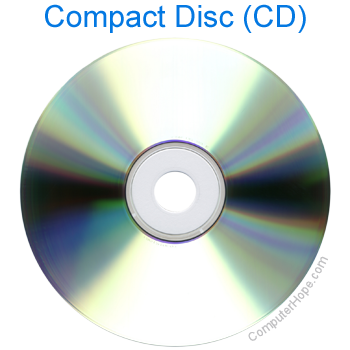
The correct answer for this quiz is number one. The original standard CD can hold up to 650 MB of data or 72-minutes of audio. CDs capable of holding 700 MB or 80-minutes of audio have also been released.
Which of the below is not a codec?
1. DivX
2. EVid
3. FLAC
4. XviD
The correct answer for this quiz is number three. EVid is not any known codec.
What is 10100110?
The correct answer for this quiz is number four. If this binary number is broken down as 128+32+4+2, it equals 166.

Which part of the computer does an EIDE cable connect to?
1. Floppy drive
2. Hard disk drive
3. Sound card
4. Video card
The correct answer for this quiz is number two. A hard disk drive connects to an EIDE cable. However, many newer computers are replacing the EIDE with the SATA interface.
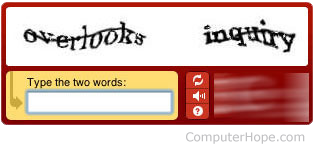
What is the name of the image below? Which is a protection scheme that requires visitors to enter the letters and numbers when filling out a form on the Internet.
1. Captcha
2. Decepcha
3. Gotcha
4. GenImage
The correct answer is number one. Short for Completely Automated Public Turing test to tell Computers and Humans Apart, a CAPTCHA is a form of protection to easily identify humans from computers. A commonly used captcha contains distorted text that is easy for humans to read but difficult or impossible for computers to read.
In the above example, a user can easily identify and type in that the image shows "overlooks" and "inquiry". Without this information being entered into the web page, a user would be unable to continue. Unfortunately, blind or hard of seeing visitors often encounter issues with a CAPTCHA because of the inability to read the letters shown in the image. To help allow these users to still access pages, some companies are also now incorporating audible CAPTCHAs that will read the letters aloud to the user.
Which of the examples below of a programming code contains an example of a regular expression?
1. $expression = 1;
2. my @expression;
3. $total = $exp + $exp2;
4. $total =~ s/[0-9]+/\*//g;
The correct answer for this quiz is number four. The $total =~ s/[0-9]+/\*//g; example is an example of a regular expression. In this example, the regular expression takes any number 0 through 9 with no size limitation and replaces it with an asterisk (*) in the $total variable.
In what year did Time Magazine name the personal computer the machine of the year?
1. 1978
2. 1980
3. 1982
4. 1995
The correct answer for this quiz is number three. In 1982, Time magazine named the personal computer as the machine of the year, the first non-human to be nominated.
Which of the below is the GUI commonly used with Linux?
The correct answer for this quiz is number four. GNU Network Object Model Environment, or GNOME, is a graphical user interface (GUI) and a set of computer desktop applications for Unix-based operating systems. GNOME makes it easier for end users to use Linux and Unix.
Which of the below is not a type of computer memory?
1. DIMM
2. MIMM
3. RIMM
4. SIMM
The correct answer for this quiz is number two. A MIMM is not a known type of computer memory.
Who created the first mouse?
1. Bill Gates
2. Douglas Engelbart
3. John Mauchly
4. Robert Noyce
The correct answer for this quiz is number two. Douglas Englebart invented The mouse in 1963. He was working at the Stanford Research Institute, which was a think tank sponsored by Stanford University.
Which of the following is not an antivirus company?
1. AVG
2. Panda
3. Symantec
4. Xargon
The correct answer for this quiz is number four. Xargon is not an antivirus company or a name of an antivirus product. See our AVG, Panda, and Symantec company pages for further information about each of these antivirus and security companies.
What is the transfer rate of USB 2.0?
1. 12 MBps
2. 64 MBps
3. 256 MBps
4. 480 MBps
The correct answer for this quiz is number four. USB 2.0 or Hi-Speed USB can transfer up to 480 MBps of data, which is a lot faster than the previous USB 1.1 12 MBps.
What MS-DOS command can display hidden files?
The correct answer for this quiz is number one. The attrib command can display files that were marked as hidden.
What command clears the screen in MS-DOS and the Windows command line?
The correct answer for this quiz is number three. The cls command is the command used to clear the screen. Users who're more familiar with Linux or Unix may have chosen clear as it is the command often used to clear the screen at the command line.
Which of the following is not a social network site?
1. Amazon
2. MySpace
3. Orkut
4. Twitter
The correct answer is number one. Amazon is a site that allows users to purchase products. Although it has a community who review many of the products listed on the site, it isn't considered a social networking site.
Which of the below versions of Windows was the first to be released after Windows 98?
1. Windows 99
2. Windows 2000
3. Windows Me
4. Windows XP
The correct answer for this quiz is number two. Windows 98 was released in June 1998, a few years later Microsoft Windows 2000 was released in February 2000, and a few months later Windows Me was released.
Who was one of the original founders for the Intel corporation?
1. Bill Gates
2. Jerry Yang
3. Gordon E. Moore
4. Sergey Brin
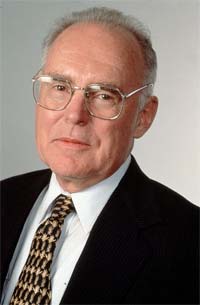
The correct answer to this quiz is number three. With Robert Noyce, Gordon Moore was one of the founders of the Intel corporation and is also widely known for Moore's law.
What is the name of the section of Microsoft Windows shown in the picture below?

1. Quick Launch
2. Notification area
3. Taskbar
4. Time
The Notification Area, sometimes referred to as the Systray, was introduced with Microsoft Windows 95. By default, it is located in the bottom right portion of the window.
Which of the options below is a type of connector used with a CD-ROM or other disc drive?
1. DB-15
2. Molex
3. PS/2
4. RJ-11

The Molex is a power connector that is used to power CD-ROM and other disc drives. Although DB-15, PS/2 and RJ-11 are all types of connectors used with computers they're not affiliated with CD-ROM drives.
Where are the device drivers settings for Microsoft Windows stored?
1. BIOS
2. CMOS
3. EEPROM
4. Registry
The correct answer for this quiz is number four. Drivers and other system and software settings in Microsoft Windows 95 and later are stored in the Windows registry.
Which of the below power line issues can cause problems with your computer?
1. Line sag
2. Line surge
3. Line noise
4. All of the above
The correct answer for this quiz is number four. Power line sags, surges, and noise can all cause issues with your computer.
What is the name of the person in the photograph below?
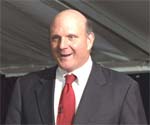
1. Bill Gates
2. Dan Bricklin
3. Sergey Brin
4. Steve Ballmer
The correct answer for this quiz is number four. This picture is of Steve Ballmer, who at the time of the picture was Microsoft's CEO.
Which of the options below is not an iPod Apple has released?
1. iPod Mini
2. iPod Nano
3. iPod Shuffle
4. iPod Vision
The correct answer for this quiz is number four. The iPod Vision is not a name of an iPod that Apple has released. However, the iPod Mini, iPod Nano, and iPod Shuffle are all different versions of Apple iPods.
Which of the below is not related to the Internet and web development?
The correct answer for this quiz is number one. DOS (MS-DOS) is a command line interpreter and has no direct relation to the Internet or web development. However, HTML, Java, and PHP are all related to web development.
What is Apache?
1. browser
2. computer
3. operating system
4. web server
The correct answer for this quiz is number four. Apache is an open source web server and according to a Netcraft 2008 survey more than three-quarters of servers on the Internet are using it to deliver web pages to users.
What command is most likely to log you out of an FTP command line?
1. bye
2. end
3. logoff
4. logout
The correct answer for this quiz is number one. Although some FTP programs may have multiple methods of ending the session, the most universal method of quitting an FTP command line session is with the "bye" command.

What is the input device primarily used with a PDA?
1. keyboard
2. mouse
3. scanner
4. stylus
The correct answer for this quiz is number four. The stylus is the primary input device used with a PDA. Although many PDA devices today also have support for each of the other input devices mentioned.
What was the original Apple computers logo?
1. Rainbow Apple logo
2. Rainbow Apple logo with a bite
3. Red Apple logo
4. Sir Isaac Newton under an apple tree
The correct answer for this quiz is number four. The original Apple computer company logo had Sir Isaac Newton sitting under an apple tree that was later replaced by a rainbow colored apple with a bite out of it in 1976.

What is the name of the port in the picture below?
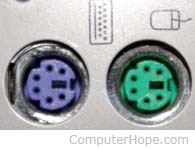
The correct answer for this quiz is number three. This port is known as the PS/2 port and as seen in the picture is used with many PC's mouse and keyboard. Today, this port is still found on computers but is widely being replaced by the USB port.
What is XML short for?
1. eXtensive Markup Language
2. eXtensive Markup List
3. eXtension Markup List
4. eXtensible Markup Language
The correct answer for this quiz is number four. XML is short for eXtensible Markup Language and is a specification developed by W3C. XML is similar to HTML in that it uses tags to markup a document, allowing a browser to interpret the tags and display them on a page.
What is the minimum memory requirements for Microsoft Windows XP?
1. 32 MB
2. 64 MB
3. 128 MB
4. 256 MB
The correct answer for this quiz is number two. Although not recommended today, 64 MB is the minimum amount of memory Microsoft Windows XP required to run effectively.
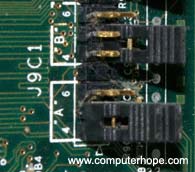
What is shown in the picture below?
1. caps
2. dip switches
3. jumpers
4. plugs
The correct answer for this quiz is number three. Jumpers used on hardware devices and the computer motherboard allow the devices to close an electrical circuit by allowing electricity to flow between two pins. Today, jumpers are not frequently adjusted with many devices supporting PnP.
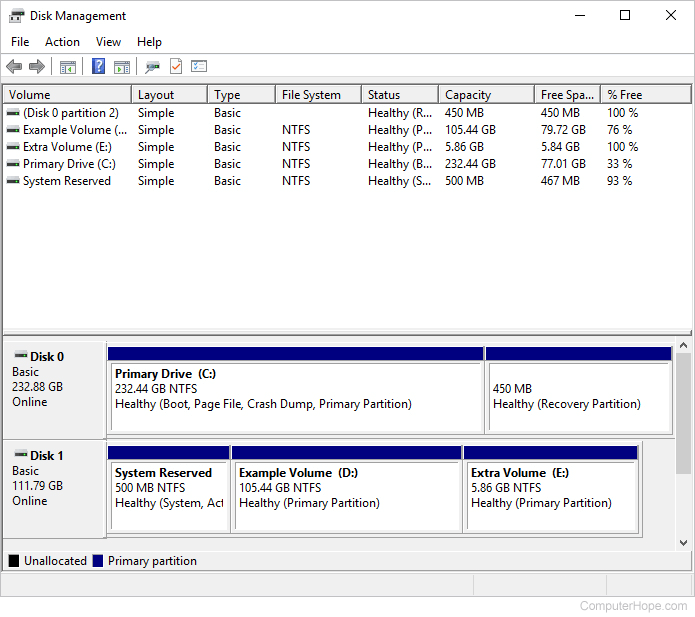
Which of the below utilities allow you to view a drives partition information?
1. Chkdsk
2. Disk Management
3. Device Manager
4. Scandisk
The correct answer for this quiz is number two. Disk Management in the Computer Management section of Windows allows the user to view and customize their hard disk drive partition information.
Which of the below media types hold the most information?
1. Blu-ray
2. CD
3. DVD
4. Floppy diskette
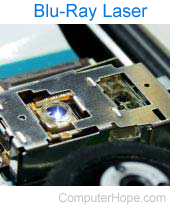
The correct answer for this question is number one. A Blu-ray disc by far holds more data than a CD, DVD, or floppy diskette. Unlike the other media types a Blu-ray disc holds 25 GB on a single layer disc and 50 GB on a dual layer disc.
Which below IP address would be used for a local network?
1. 74.125.127.100
2. 69.72.169.241
3. 192.168.1.100
4. 209.131.36.100
The correct answer is number three. 192.168.1.100 is an IP address most likely to be assigned to a computer or networking device in a local network.
What is BIOS short for?
1. Not short for anything
2. Basic Input/Output System
3. Binary Input/Output System
4. Bus Input/Output System
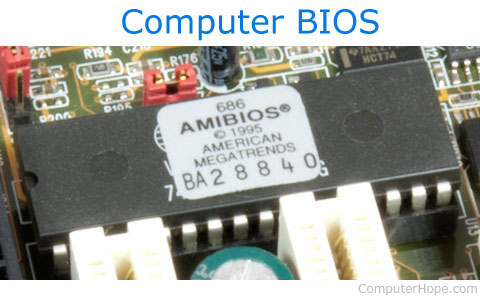
The correct answer for this question is number two. BIOS is short for Basic Input/Output System. BIOS is a chip on all computer motherboards containing instructions and set up for how your system should boot and how it operates.
How many devices can SCSI support?
The correct answer for this question is number two. The traditional SCSI interface can support up to eight different drives and up to 16 devices with Wide SCSI.
Where is the BIOS stored?
1. On the hard drive
2. On a diskette
3. On a USB drive
4. On a flash memory chip
The correct answer for this question is number four.The Basic Input/Output System or BIOS is stored on a flash memory chip found on the computer motherboard.
What type of memory is volatile
1. Cache
2. Hard drive
3. RAM
4. ROM
The correct answer for this question is number three. RAM is a volatile memory, which means if the power to the computer is lost or the computer restarts, the memory contents would be lost.
Which network protocol is used to send e-mail?
The correct answer for this question is number four. Simple Mail Transfer Protocol or SMTP is the network protocol used to send e-mail and POP is often used to retrieve e-mail.
Which of the below is not a type of computer battery?
1. BIOS
2. CMOS
3. Li-ion
4. NiMH
The correct answer for this question is number one. Although BIOS is a part of the computer. It is not a type of battery.
When was the first e-mail sent?
1. 1963
2. 1969
3. 1971
4. 1974
The correct answer for this question is number four. The first e-mail was sent by Ray Tomlinson in 1971. By 1996, more electronic mail was sent than postal mail.
Which of the below has the most capacity?
1. 100 GB
2. 100 KB
3. 100 MB
4. 100 TB
The correct answer for this question is number four. 100 TB or 100 terabytes would have much more capacity than 100 KB, 100 MB, and 100 GB.
What is SSL short for?
1. Secure Sockets LAN
2. Software Security Layer
3. Secure Software Layer
4. Secure Sockets Layer
The correct answer for this question is number four. SSL (secure sockets layer) is a technology developed by Netscape to help protect data sent over the Internet, such as credit card information, by encrypting that data before sending it.
Which of the below is not an iPhone 4 feature
1. 4 G
2. Front facing camera
3. HD recording
4. Multitasking
The correct answer for this question is number one. Despite the name, the iPhone 4 does not have 4 G support. However, does have a front facing camera and supports HD recording and multitasking.
What port is SMTP commonly on?
The correct answer for this question is number three. In almost all situations Simple Mail Transfer Protocol (SMTP) resides on port 25.
A DNS translates a domain name into what?
The correct answer for this question is number three. When entering a web address aka URL that address is then sent to a DNS, which translates that address to an IP address.
Who famously said "640 K ought to be enough for anybody."
1. Bill Gates
2. Steve Jobs
3. Steve Wozniak
4. None of the above
The correct answer for this question is number four. Many incorrectly believe that in 1981 Bill Gates said "640 K of memory should be enough for anybody." However, Bill Gates has denied on several occasions ever saying this quote and there is no actual proof of him saying it. Although Bill Gates never said this quotation, the rumor spreads because of how ridiculous it sounds with how much memory is used in computers today.
What is the maximum characters Linux supports in its file names?
1. 8
2. 128
3. 256
4. Unlimited
The correct answer for this question is number four. Linux supports file names of up to 256 characters.
In Perl, what does a scalar variable always begin with?
The correct answer for this question is number three. Scalar variables always begin with a dollar sign ($). For example, $example is considered a scalar variable, @example is considered and array, %example is considered a hash, and any line beginning with # would be remarked statement.
HTML Tags are case-sensitive.
The correct answer for this question is false. HTML tags are not case-sensitive and can be typed in any case. However, the attributes in the HTML tag may be case-sensitive. For example, a file name in an img HTML tag is case-sensitive.
What IRQ does COM1 commonly use?
The correct answer for this question is number four. COM1 and COM3 on a PC are defaulted to use IRQ 4 and COM2 and COM4 are commonly defaulted to use IRQ 3.
What Linux command displays the last part of a file without editing it?
1. end
2. foot
3. last
4. tail
The correct answer for this question is number four. The tail command displays the last few lines of a file without editing it. This command can be very useful for reviewing files that are updated frequently such as log files and quickly seeing latest added lines.
What is the default port number for Apache and most web servers?
The correct answer for this question is number four. Port 80 is the default outgoing port for a web server's HTTP traffic, and the port your computer uses to browse the Internet.
What company built the first processor in the Apple Macintosh
1. AMD
2. Apple
3. Intel
4. Motorola
The correct answer for this question is number four. The original Macintosh had processors built by Motorola. Today, however, Intel manufactures the processors for Apple computers.
What is a firewall?
1. Antivirus program
2. Internet blocker
3. Internet filter
4. Internet logger
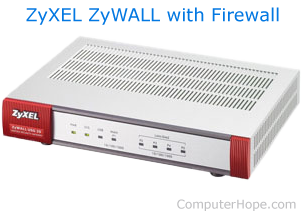
The correct answer for this question is number three. A firewall helps protect computer networks by filtering all Internet traffic. If incoming or outgoing Internet traffic is unwanted, it is blocked (filtered). A firewall appliance, using dedicated hardware to filter Internet traffic, is pictured on this page.
In Perl, if $var = "1"; and you print 'You win $var dollar(s)'; what would it return?
1. You win $var dollar(s)
2. You win $1 dollar(s)
3. You win 1 dollar(s)
4. You win 0 dollar(s)
The correct answer for this question is number one. In Perl when the print statement uses a single quote (') instead of a double quote ("), Perl prints the enclosed literal string. Meaning, regardless of whether a variable var exists, the dollar sign in the string is treated literally, not as the indicator of a variable name. To print the value of the variable var, use double quotes to enclose your string: "You win $var dollars".
What is phishing?
1. A computer virus
2. A corrupt website
3. A distribution of spam
4. An identity theft scheme
The correct answer for this question is number four. Pronounced like "fishing," phishing is the malicious act of sending deceptive e-mail to scam the recipient. Phishing is often used to procure money or valuable information from the recipient under false pretenses, or without their knowledge.
A six digit Hex color code (#ADD8E6) defines values of Red, Blue, and Green in what order?
1. #RRBBGG
2. #GGRRBB
3. #RRGGBB
4. ##BBRRGG
The correct answer for this question is number three. HTML color codes are hexadecimal triplets representing the colors red, green, and blue (#RRGGBB). For example, in the color red, the color code is FF0000, which is '255' red, '0' green, and '0' blue. These color codes can change the color of the background, text, and tables on a web page.
JavaScript is ....?
1. a client-side scripting language
2. a server-side scripting language
3. a virus
4. another name for Java
The correct answer for this question is number one. JavaScript is a client-side scripting language that is run in your browser instead of from a server. Using JavaScript a developer can add features that are not available through HTML without having to rely on a server-side language like PHP or Perl.
Who is considered to be the first programmer?
1. Ada Lovelace
2. Alan Turing
3. Bill Gates
4. Tim Berners-Lee
The correct answer for this question is number one. Ada Lovelace is considered to be the world's first programmer. See the bio pages for Alan Turing, Bill Gates, and Tim Berners-Lee for additional information about each of these computer pioneers.
Which of the below is a valid HTML element?
1. <strong>bold text<strong>
2. </strong>bold text</strong>
3. <b>Bold text<b>
4. <b>bold text</b>
The correct answer for this question is number four: <b>bold text</b> is the only valid element; the others lack a closing tag. Closing tags start with </ and end in >, and they indicate the end of the element.
How many layers are in the OSI model?
The correct answer for this question is number four. There are seven layers in the OSI (Open System Interconnection) model.
Which of the following is not a type of hard drive?
The correct answer for this question is number two. IDE, SATA, and SCSI are all types of computer hard disk drives. However, IDS is not a type of hard drive, it is a type of intrusion detection system used with computers.
How many blocks of numbers are in an IP address?
The correct answer for this question is number four. An IPv4 address has four blocks of numbers ranging from 0 to 255, for example, 69.72.169.241 is an example of an IP address.
What are three types of networks?
1. LAN TAN WAN
2. LAN SAN WAN
3. LAN PAN WAN
4. LAN MAN WAN
The correct answer for this question is number four. LAN, MAN, and WAN are three examples of computer networks.
Which of the following people was a co-founder of Microsoft?
1. Steve Wozniak
2. Paul Allen
3. Bill Moggridge
4. Gary Starkweather

The correct answer for this question is number two. Paul Allen was the co-founder of Microsoft.
What program allows an Apple computer to run Microsoft Windows?
1. Bonjour
2. Boot camp
3. iBoot
4. None of the above
The correct answer for this question is number two. Boot camp allows an Apple user using macOS X v10.5 or higher to install Microsoft Windows and run most Windows programs on an Apple computer.
What cable connects a cable modem to a wireless router?
1. CAT5 cable
2. Coaxial cable
3. RJ-11 cable
4. No wire
The correct answer for this question is number one. A CAT5 cable or standard network cable is what connects a cable modem to a wireless router. It lets you share your Internet connection with multiple computers on your network.
What language does the computer use and understand?
1. High-level
2. Assembly
3. Machine
4. None of the above
The correct answer for this quiz question is number three. The computer only understands machine language. High-level languages are programming languages designed to be written, and read, by humans.
What does TCP breaks data into?
1. Binary
2. Bits
3. Files
4. Packets
The correct answer for this question is number four. Data transmitted over the Internet is broken into packets when transmitted over a network such as the Internet.
What is subscript?
1. Text that is smaller and below the baseline
2. Text that is smaller and above the baseline
3. Text that is larger and below the baseline
4. Text that is larger and above the baseline
Subscript is a type of text formatting that makes text smaller and below the baseline. For example, this text should appear subscript. The opposite of subscript is superscript, which is smaller text that is above the baseline.
What character is used in an OR operator?
1. Ampersand
2. Bracket
3. Colon
4. Pipe
The pipe character ( | ) is used as an OR operator. For example:
if (($value1 == 2) || ($value2 == 3)) { print "True"; }
The double pipe is the OR operator and means if value1 equals 2 OR value2 equals 3, print "True" to the screen. The ampersand, bracket, and colon are all used differently.