
Use the Windows Magnifier to zoom in on parts of your screen
Updated: 05/01/2023 by Computer Hope
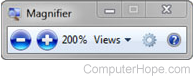
The Windows Magnifier is a great accessibility tool that lets you zoom into any portion of your screen you find hard to read. This feature is found in the Control Panel in the Ease of Access Center. It can also be quickly accessed with the keyboard shortcut Windows key++ (plus) to zoom in and Windows key+- (minus) to zoom out. When enabled, the Magnifier box and the current magnification is shown, as seen in the picture.