
Tree command
The tree command allows users to view an easy-to-read list of files and folders.
Availability
Tree is an external command available for the following Microsoft operating systems as tree.com.
- All Versions of MS-DOS
- Windows 2000
- Windows XP
- Windows Vista
- Windows 7
- Windows 8
- Windows 10
- Windows 11
Tree syntax
Windows 10 and 11 syntax
TREE [Drive:][Path] [/F] [/A]
| Drive:\Path | Drive and directory containing disk for the display of directory structure. |
| /F | Display the names of the files in each folder. |
| /A | Use ASCII (American Standard Code for Information Interchange) instead of extended characters. |
Windows 8 and earlier syntax
TREE [Drive:][Path] [/F] [/A]
| Drive:\Path | Drive and directory containing disk for the display of directory structure. |
| /F | Displays the file names contained in each directory. |
| /A | Extended characters are used for linking lines instead of graphic characters. /a is used with code pages that do not support graphics characters and to send output to printers that do not properly interpret graphics characters. |
Tree examples
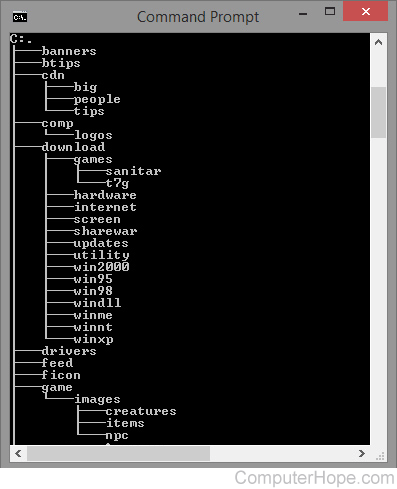
The tree command typed alone produces a listing and overview of the current directory (shown in the image).
tree
In the example, C: is the current directory, "banners" is one of the directories, and "big" is a subdirectory of the "cdn" directory.
tree /F
The command above uses the tree command with the /F switch. The resulting output would include the names of files located in each of the directories in the tree. Depending on how many files are located in each directory, the tree listing could be quite long.
- See our tree structure definition if you need further information on the structure of a tree.
To output the structure of a directory to a file, and other options, try using the dir command.