
Linux lpr command
On Unix-like operating systems, the lpr command submits print jobs.
Description
lpr submits files for printing. Files named on the command line are sent to the named printer (or the default destination if no destination is specified). If no files are listed on the command-line, lpr reads the print file from the standard input.
Printing in Linux
The simplest way to print in Linux is to cat a file to the printing device, like this:
sudo cat my-file-to-print.txt > /dev/lp
What this command does is read the file my-file-to-print.txt and send it, byte by byte, to the printer device /dev/lp. This name is a symbolic link to the device, and may vary. Your printer may be another device name, for instance lp0. Normally cat sends its output to standard output (the terminal) but here we redirect it to the device /dev/lp with the > operator. Only the superuser can write directly to the printer device, which is why we have to preface the command with sudo.
lpr is more user-friendly than this, however, and it lets you queue print jobs. And most importantly, it lets you access the printer device without being the superuser.
Installing lpr, lpd, and CUPS
The way lpr works, in a nutshell, is: it reads in the file and hands the printable data over to the linux printing daemon, lpd. lpd is a legacy piece of software for Linux, but it is supported under the modern system used by most Linux distributions, CUPS (the Common Unix Printing System).
You may need to manually install CUPS, and lpr itself, to print this way. If you're operating Debian, or a Debian-derived Linux system like Ubuntu that uses the APT package managements system, you can install them by running the following command:
sudo apt-get update && sudo apt-get install cups cups-client lpr
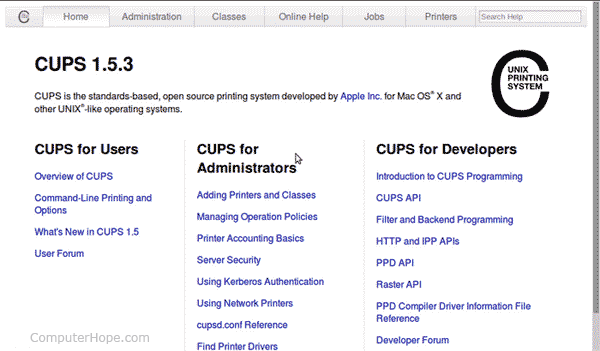
This command will install the Common Unix Printing System on your system. You can now set up CUPS by directing any web browser to the address: http://localhost:631
Doing so opens a web-based CUPS configuration screen, which should look something like this:
Then, from the command line, add your user to the group lpadmin with the command:
sudo adduser <yourusername> lpadmin
This command adds you to the group of users allowed to administer printers on your system. Now go back to the CUPS web administration panel, and under the administration tab, select "Add Printer." You will be prompted for your username and password, and can set up a new printer.
Syntax
lpr [ -E ] [ -H server[:port] ] [ -U username ] [ -P destination[/instance] ]
    [ -# num-copies [ -h ] [ -l ] [ -m ] [ -o option[=value] ] [ -p] [ -q ]
    [ -r ] [ -C/J/T title ] [ file(s) ]
Options
| -E | Forces encryption when connecting to the server. |
| -H server[:port] | Specifies an alternate server. |
| -C "name" -J "name" -T "name" |
Sets the job name. |
| -P destination[/instance] | Prints files to the named printer. |
| -U username | Specifies an alternate username. |
| -# copies | Sets the number of copies to print from 1 to 100. |
| -h | Disables banner printing. This option is equivalent to "-o job-sheets=none". |
| -l | Specifies that the print file is already formatted for the destination and should be sent without filtering. This option is equivalent to "-o raw". |
| -m | Send an e-mail when a job is complete. |
| -o option[=value] | Sets a job option. |
| -p | Specifies that the print file should be formatted with a shaded header with the date, time, job name, and page number. This option is equivalent to "-o prettyprint" and is only useful when printing text files. |
| -q | Hold job for printing. |
| -r | Specifies that the named print files should be deleted after printing them. |
Examples
lpr myfile.txt
Submits a request to print the file myfile.txt.
cat myfile.txt | lpr
cat a file (myfile.txt), piping the output to lpr, which reads its contents from standard input and sends it to the print daemon for printing.
lpr -#3 myfile.txt
Print 3 copies of myfile.txt.
Related commands
hostname — Set or print the hostname of system.
lp — Print a file on the System V operating system.
lpc — Control line printers.
lpq — List the status of available printers.
lprm — Remove requests from the print queue.
lpstat — List the status of the LP print services.
mail — Read, compose, and manage mail.