
How to add color to a black and white photo in Photoshop
Updated: 05/21/2018 by Computer Hope
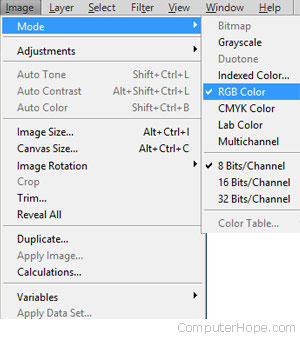
When scanning an image as black and white, the image mode is set to black and white (grayscale) and does not allow you to adjust any colors. The color mode must be changed before using any colors. To change the color mode, follow the steps below.
- Click Image.
- Click Mode.
- Click RGB Color.
Once the three steps above are completed, all available colors can be used with your photograph or image.