
How to enable or disable the Microsoft Outlook preview pane
To enable or disable the e-mail message Preview pane, also known as the Reading pane, in the Microsoft Outlook program and the Outlook.com online e-mail service, follow the steps below.
This page only refers to the "Preview pane" or "Reading pane" feature in Microsoft Outlook or Outlook.com mail, not the "Outlook Mail (Preview)" version of Outlook.com. If you have Outlook Mail (Preview), according to Microsoft, there is no way to revert to the previous version of Outlook.com. Please contact Microsoft support for more details and help.
Microsoft Outlook
The steps below are for the Microsoft Outlook program that is installed on a computer. Realize these steps may vary slightly depending on the version of Outlook you are using.
Enable Preview pane
- Open the Microsoft Outlook program.
- Click the View menu or tab at the top of the program window.
- Click the Reading pane or Preview pane option.
- Select the Right or Bottom option, depending on where you want the Preview pane displayed.
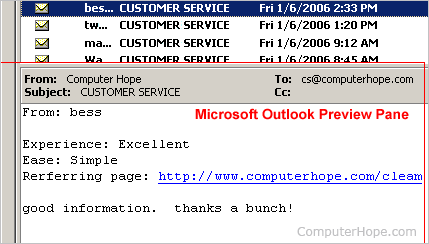
Above is an example image of what the Microsoft Outlook Preview pane looks like when enabled. The Preview pane in this example is displayed under the e-mail listing and it displays the e-mail message currently selected.
Disable Preview pane
- Open the Microsoft Outlook program.
- Click the View menu or tab at the top of the program window.
- Click the Reading pane or Preview pane option.
- Select the Off option.
Outlook.com (formerly Hotmail)
The steps below are for the Outlook.com (previously known as Hotmail) online e-mail service, available through an Internet browser.
Enable Reading pane
- Log in to your Outlook.com e-mail account.
- In the menu bar, click the gear icon to the left of your name, as displayed in the picture below.
- Select the Options option.
- Under the Reading email section, click the Reading pane option.
- Select the Right or Bottom option, depending on where you want the Reading pane, and click the Save button.
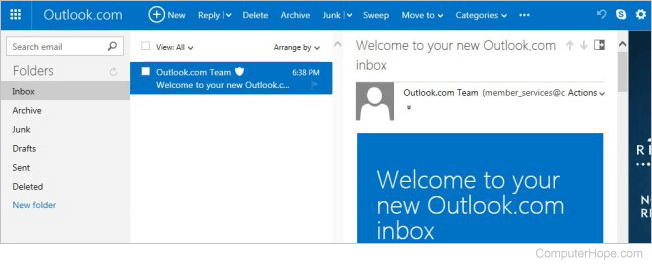
Above is an example image of what the Outlook.com e-mail Reading pane looks like when enabled. The Reading pane in this example is displayed to the right of the e-mail listing and it displays the e-mail message currently selected.
Disable Reading pane
- Log in to your Outlook.com e-mail account.
- In the menu bar, click the gear icon to the left of your name, as displayed in the picture above.
- Select the Options option.
- Under the Reading email section, click the Reading pane option.
- Select the Off option and click the Save button.