
How to remove red-eye in a picture
Updated: 12/31/2017 by Computer Hope
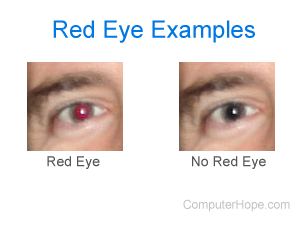
There are various applications to help you remove red-eye from a digital picture. We recommend using a free online service for quick conversions, and Google Photos for users who want to convert multiple images.
Online services to remove red-eye
If you do not want to download a program, we recommend using the free and easy to use Fotor for removing red-eye and doing any other image adjustments quickly.
How to remove red-eye in Adobe Photoshop
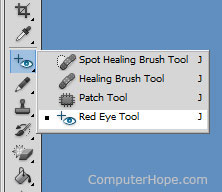
To remove red-eye in Adobe Photoshop, use the Red Eye Tool, as shown in the picture. Once this tool is selected, click any portion of the red eye to fix the eye.
Tip
You can press Shift+J to cycle through the tools until the Red Eye Tool is selected.