
How to create or delete an Instagram account
Updated: 03/10/2024 by Computer Hope

Instagram is a massively popular social media platform for sharing personal photos and videos. To create a free Instagram account and begin using the service, follow the steps below.
How to create an Instagram account on a computer
General sign-up
- In a web browser, go to Instagram.com.
- Fill out the information form on the front page (Full Name not required).
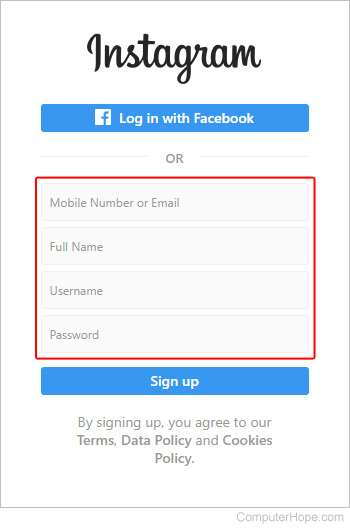
- Click the
 button.
Log in with your Facebook account
If you have an active Facebook account, use it to sign up for and link to an Instagram account. This action lets you post on both social media platforms at the same time.
- In a web browser, go to Instagram.com.
- Click the
 button in the middle of the screen.
 - Fill out your Facebook login information and click the Log in button.

- Your Instagram account should now be linked and active.
How to create an Instagram account on an Android or iOS device
General sign-up
- Download the Instagram app from the Google Play Store (Android) or the App Store (iOS).
- Open the app.
- At the bottom of the screen, tap Sign up with e-mail or phone number.
- Choose whether you want to sign up with a Phone (A) or an Email address (B), and then fill out the required information (C).
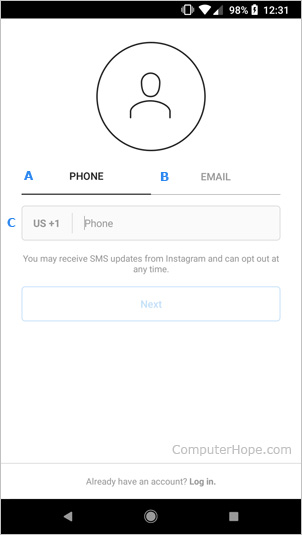
- Once you've finished, click the
 button.
 - When prompted to give the app required permissions on your device, tap Allow.
- Enter your Full Name and choose a Password.
- Once you've finished, click the button twice.
How to delete an Instagram account
Note
Deleting an Instagram account can only be done on the Instagram website. You cannot delete an account in the mobile app.
- In a web browser, go to Delete Your Account on the Instagram website.
- In the center of the screen, next to Why are you deleting your account, click the down arrow. Select the reason for why you're deleting your account in the
 drop-down menu.
 - Re-enter your password and click the
 button.
 - When asked if you're sure you want to delete, click the
 button.