
How to fix a 3.5" floppy detected as 5.25" floppy
If you insert a 3.5" floppy disk into your computer and it's recognized as a 5.25" floppy disk, follow these steps to fix the problem.
Floppy not set up properly in CMOS
Verify the floppy drive is properly configured in your BIOS setup. If the floppy drive is not configured as a 3.5" floppy (or not configured at all), the drive is not detected as a 3.5" floppy drive.
Floppy not connected properly
- Open the computer after powering down and unplugging it, being aware of ESD (electrostatic discharge) and its potential dangers.
- Verify the floppy connection connects to the motherboard FDD (floppy disk drive) connector. If it's connected, disconnect and reconnect the cable to verify it's seated properly.
- Verify the floppy cable coming from the motherboard connects to the back of the floppy drive. If connected, disconnect, and connect the floppy drive cable to verify it is seated properly.
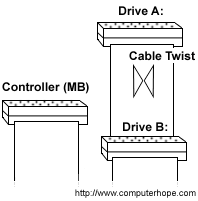
- Verify a power cable is also connected to the back of the floppy drive.
- If your floppy cable has more than one connection, verify you have connected the floppy to the appropriate connection. The picture above illustrates what drive connects to each part of the cable.
Windows 9x not detecting floppy properly
If the floppy drive is working, verify that Windows is detecting the floppy drive properly by verifying no conflicts are present in Windows Device Manager. If conflicts are present, resolve those conflicts before referring to the next paragraph. For additional information about the Device Manager, see our Device Manager page.
If no conflicts, reinstall the floppy drive by removing the floppy drive under the Disk drives category. Once removed, reboot the computer and allow Windows to redetect the floppy drive.