
How to make a network cable
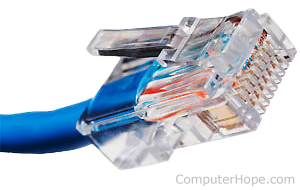
To create a network (Ethernet) cable, you need the equipment listed below.
- Cat 5, Cat 5e, Cat 6, or Cat 7 cable - This cabling can be purchased in large spindles at stores that specialize in cabling. Cat5 cabling is the most commonly used cable used today for networks.
- RJ-45 connectors - These connectors can be purchased at most electronic stores and computer stores and usually come in bulk packages. It is always a good idea to get more than you think you need.
- Crimping tool - These tools are often purchased at electronic stores. To create a network cable, you need a crimper that crimps a RJ-45 cable (not only a RJ-11 cable, which looks similar to an RJ-45).
- Wire stripper or Knife - If you plan on making several network cables, consider getting a wire stripper that strips Cat 5, Cat 6, or your cable of choice. If you do not plan on creating many network cables, a knife will suffice. To prevent potential issues, we recommend a wire stripper.
Once you have the necessary equipment needed to create a network cable, determine the type of network cable you want to create. There are two major network cables: a straight through cable and a crossover cable. Below are examples of which cable is used for each of the examples.
Straight through cable (T568A)
- Computer to hub, switch, router, or wall.
Crossover cable (T568A & T568B)
- Computer to Computer with no switch or hub.
- Network device to network device. For example, router to router.
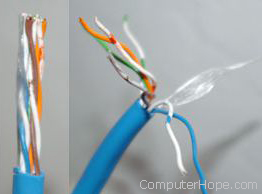
Once you have determined the type of network cable, strip the cable. We recommend stripping at least half an inch from the cable to expose the inner wires. Don't worry about stripping too much of the network cable jacket off, as you can always cut the wires down later, if needed. After the network cable jacket is removed, separate the wires in the cable so they can be put in the RJ-45 connector.
The CAT5 twisted-pair cables consist of four twisted wires, each color-coded; one a solid color, and one a striped color. As seen below, most network cables consist of a green, blue, orange, and brown pair of cables.
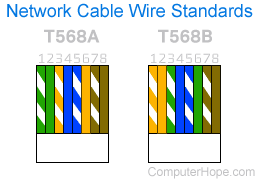
There are two cable standards: T568A and T568B. Each twisted-pair must be broken apart to create the layout, as shown above. To create a straight through cable, both ends of the cable should be identical and should match the T568A example shown above. To create a crossover cable, one end of the cable should match T568A, and one should match T568B.
After separating the cable ends to match one of the examples above, insert the cables in the RJ-45 connector and crimp (using a crimping tool) the connector. Do these steps for each side of the cable.
Once both ends of the cable are complete, connect the cable to make sure it is working.