
Network and network card help and support
Updated: 10/18/2022 by Computer Hope
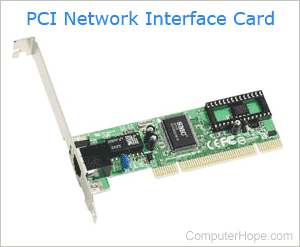
Network and network card basics
- What is a network?
- What is a network card?
- Full list of all computer network-related terms.
- How to install a computer network card.
- How to find the type of computer network controller or adapter.
- Basic network troubleshooting.
- Network equipment manufacturers and contact information.
Top network-related questions and answers
- How to connect to a Wi-Fi network.
- How to make a network cable.
- How to set up a home network.
- How to share a printer between multiple computers.
- How to use ping, winipcfg, and other network commands.
IP address-related questions and answers
- What is an IP address?
- What is my computer's IP address?
- How to find my IP address.
- How do I change my IP address?
- How to change the IP address of an Android phone or device.
- How to find a printer IP address.
- How to determine the IP address of a website.
- How to ping an IP address or website.
- How to determine the IP address of a computer or website.
- How to find the physical location of an IP address.
- How to hide my IP address.
- Why has my IP address changed?
Wi-Fi-related questions and answers
- What is Wi-Fi?
- How to connect to a Wi-Fi network.
- How to enable and disable Wi-Fi.
- Why is my Wi-Fi not working?
- How to restart a modem and router.
- How to crack the WEP code or password for Wi-Fi.
- See what and who is on your wireless network.
- How to secure your home wireless network router.
- Where do I find my WEP, WPA, or WPA2 key?
Router-related questions and answers
- What is a router?
- Differences between a network hub, switch, and router.
- How to access a home network router setup or console.
- How to reset a forgotten username and password on a router.
- How to adjust the settings of a home router.
- How to open or forward a port on a router.
- How to update a router firmware.
- Blank page when trying to open router setup.
FTP-related questions and answers
Internet-related questions and answers
Driver-related questions
- What is a driver?
- How to find computer software and drivers.
- How to install and update a computer driver.
- List of computer network card drivers.
All other network-related questions
- How to find and change my computer's name.
- How to map a network drive.
- How to know if you are using a proxy server.
- How to set up a proxy server in Firefox.
- How to view all network shares in Windows.
- How to create a personal cloud server.
- How to turn your smartphone into a Wi-Fi hotspot.
- How to view all network shares in Windows.
- How to change a computer DNS address.
- How to copy information from one computer to another.
- How to find and change the workgroup I'm in?
- How to access a home computer from work or school.
- How to log out of your computer operating system.
- How to share files between a Linux and Windows computer.
- How to find a MAC address.
- How to change a MAC address.
- How to allow a program or game through the Windows Firewall.
- How to view a networks Subnet Mask.
- How to hide the network cable is unplugged message.
- What does destination host unreachable mean?
- Missing network icon on the Windows notification area.
- Missing network protocol.
- Monitoring network upload and download data transferred.
- Incorrect protocol version.
- What's the difference between Bluetooth and Wi-Fi?
- How to remove a network drive in Windows.
- Why can I not ping microsoft.com, amazon.com, or another site?
- How to enable or disable DHCP in Windows.
- Missing desktop Network icon.
- How to attend or host a LAN party.
- How to send messages to other computers.
- How to fix an IP conflict.
- How to limit the upload on a computer.
- How to change network settings from MS-DOS.
- Why do older modem and network cards not work in Windows XP?
- IPC$ error when connecting to Windows NT or 2000.