
How to move, remove, and adjust jumpers and DIP switches
Updated: 11/13/2018 by Computer Hope
How do I remove my jumper?
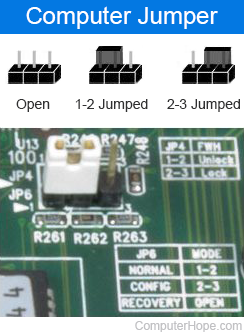
The recommended method for removing a jumper is with your fingers. However, if you cannot remove the jumper with your fingers, you can also use a pair of tweezers. When removing the jumper, ensure that you are very careful not to lose the jumper in the computer case or on the floor.
How do I move or change a DIP switch?
Most DIP switches are small in size and can be adjusted with a finger or finger nail. However, if you cannot move a DIP switch on a circuit board, use a small tool, such as a small screwdriver or paperclip, to gently adjust the switch.
Warning
Never use a pencil to adjust a DIP switch, as the residue from the pencil can damage the system.