
Jumper
Jumper may refer to any of the following:
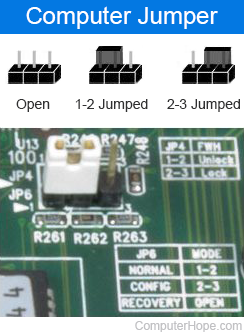
1. Jumpers allow the computer to close an electrical circuit, allowing the electricity to flow on a circuit board and perform a function. Jumpers consist of small pins that can be covered with a small plastic box (jumper block), as shown in the illustration. Below the illustration is a picture of what jumpers may look like on your motherboard. In this example, the jumper is the white block covering two of the three gold pins. Next to the pins is a silkscreen description of each pin setting. The picture shows pins 1-2 jumped for Normal mode, 2-3 for config mode, and when open (no jumper), the computer is in recovery mode.
A jumper may also be called a jumper shunt or shunt.
Jumpers manually configure computer peripherals, such as the motherboard, hard drives, modems, sound cards, and other components. For example, if your motherboard supports intrusion detection, a jumper can be set to turn this feature on or off.
Before plug and play, jumpers were used to adjust device resources, such as changing what IRQ (interrupt request) the device uses. Today, most users don't need to adjust jumpers on their motherboard or expansion cards. Usually, you are most likely to encounter jumpers when installing a new drive, such as a hard drive. As shown in the picture, ATA (Advanced Technology Attachment) hard drives have jumpers with three sets of two pins. Moving a jumper between two pins changes the drive from primary drive, secondary drive, or cable select.
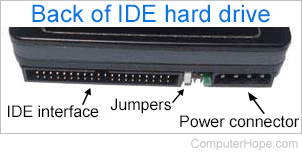
Some documentation may refer to setting the jumpers to on, off, closed, or open. When a jumper is on or covers at least two pins, it's a closed jumper. When a jumper is off, covering only one pin or the pins have no jumper, it's an open jumper.
When changing the jumpers on any device, the device and your computer must be turned off. Also, whenever working inside a computer or with any electronic device, be aware of ESD (electrostatic discharge).
How many jumpers are on a motherboard?
Every computer motherboard is different, so there is no way to know how many jumpers are on a motherboard unless you know the motherboard's manufacturer and model number. Once this information is known, this question can be answered by consulting the motherboard's documentation.
What if my jumper doesn't have a jumper block?
If you're building a computer, most manufacturers include extra wires, screws, and jumper blocks in the motherboard box. If you cannot find an extra jumper block but see another jumper on the motherboard that's only on one pin, it can be used. Alternatively, if you have other spare hardware with a jumper block, it can be borrowed from any other device.
What is jumperless?
Jumperless describes any hardware configured through software only with no jumpers.
2. With electronics, a DuPont wire, jumper, or jumper wire is an electrical wire to test a circuit without soldering. For example, while designing a prototype for an electronic device, the designer may use a breadboard with jumper wires acting as the circuit in the component.
3. With an Internet or telephone connection, a jumper wire is a connection made by your service provider from the telephone exchange to the MDF (main distribution frame).
Alligator clip, Cable, Circuit, Connection, Dip switch, Electronics terms, Hardware terms, Jump, Master, Slave, Wire