
404
404 may refer to any of the following:

1. A 404 is an HTTP (hypertext transfer protocol) status code indicating that the page you are trying to access does not exist at that location.
See our HTTP definition for a listing of other HTTP error codes.
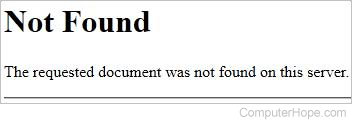
Example 404 error
Below is an example of how a generic 404 error message may look on a web page.
What should I do when I get a 404 error?
If you are visiting a web page and get a 404 error, there is nothing you can do to get the page to work again. However, if you receive a 404 error on a website you control, you can try the suggestions below to resolve the error.
Creating a custom 404 page
If you run a website or blog, it is essential you create a custom 404 page to help direct visitors who encounters this error. If you can access the .htaccess file and want to create a custom 404 error page, add the line below into your .htaccess file. In the example below, any time a visitor encounters a 404 error, they are directed to the my_404.htm page. If you have a web-based Control Panel, such as cPanel, your 404 error pages can also be customized in that Control Panel.
ErrorDocument 404 /my_404.htm
Tips on creating a smart 404 error page
- At the very least, make sure your 404 error page has links to other sections of your site. One example is a link to your site map.
- If your site or blog has a search engine, make sure it is visible on the 404 error page.
- If you are using Google Analytics, set up error tracking so you can know about your 404 errors. 404 errors are also in the Google Webmaster tools.
- If you are familiar with a scripting language, instead of referring a static 404 page, make it dynamic. For example, the Computer Hope 404 page logs each error, runs the attempted URL (uniform resource locator) though an algorithm to give a recommendation, and finds keywords to use in the search box.
If you are a webmaster and have moved a web page to an alternate location, use a 301 error code. If you have removed something with no intentions of returning it, use a 410.
2. 404 is a US area code. See our 404 area code listing for further information.
3. 404 is shorthand and slang used in text-based communications that indicates you have no idea.
410, Chat terms, Computer slang, Error, HTTP, SEO terms, Web design terms