
Sizing handle
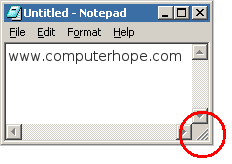
Alternatively called a handle, drag handle, sizing grip, or resize corner, the sizing handle is a tool found in a GUI (graphical user interface) that allows users to resize an object. For example, as you can see in the image, many windows in the Microsoft Windows operating system have a sizing handle in the lower-right corner. A user can click this indicator and move it around to resize the window.
Sizing handles in image editors
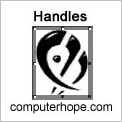
When working within an image editor, handles are small black boxes located at several points on the border of an image. They allow the user to increase the size horizontally, vertically, or diagonally, depending on their position. As shown in the example picture, this image editor provides the user with eight handles, one on each corner, and the center of each edge. This interface is sometimes called the Transform Tool or Free Transform.
How to resize an image
To adjust the size of an image, window, or other objects using a drag handle, first move the mouse cursor over it until you see a double-headed arrow. While the double-headed arrow is visible, press and hold the left mouse button and then resize the object to your liking. Once you are satisfied, release the left mouse button.
Bounding box, Fill handle, Handle, Microsoft Windows, Operating system terms