Computer Hope

Other Pages

Home
Site map
Computer help

Dictionary
News
Q&A
What's new

Tools

E-mail this page
Print Preview
Edit this page


Open Recent Items using Jump List

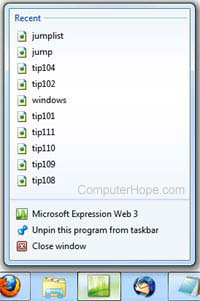
jump list pictureWindows 7 makes it very easy to retrieve recently opened files, using the new Jump List feature as shown in the picture to the right.

To do this, follow the instruction below:

  1. Right-click on the icon in the taskbar that contains the file you want to open, and it will bring up a list of recently opened files. In the picture to the right we right-clicked the Microsoft Expression Web 3 icon.
  2. Click on the file you are looking for and it will open. This works for all Windows programs and will likely improve as more programs become compatible with the new features available in Windows 7.

Computer tips home - Windows tips

Index

Category:
Windows tips

Companies:
Microsoft

Related Pages:
Tips main page

Resolved

Were you able to locate the answer to your questions?

Home - Computer help - Contact - Dictionary - Links
Link to Computer Hope - Bookmark Computer Hope