
The Sims
The Sims overview
 Type: Strategy
ESRB Rating: Teen
Release Date: 02/04/2000
Developer: Maxis
Publisher: Electronic Arts
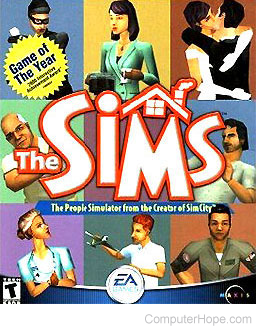
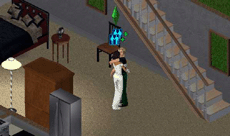
The Sims is a creation from the makers who really invented the word SIM. In their first edition, The Sims, the object of the game is to manage and control people. While this concept may sound easy and maybe even boring to some people, The Sims is completely the opposite.
You will find yourself with several dilemmas as you first begin by buying or making a house, as well as very little money and items, such as furniture or food, in your house. One of your primary tasks in the game is getting a job. By getting a job, you begin to make a living and buy more advanced items for your house, enhancing your character's life, and becoming more successful and happy. You must also keep your Sims satisfied in such areas as social, entertainment, hunger, and cleanliness.
The Sims is a must for anyone who enjoys simulation games or likes to act out portions of their life and watch the consequences.
System Requirements: Microsoft Windows - Apple - Linux
| Windows System Requirements | |
|---|---|
| Operating System: | Windows 95, Windows 98 |
| Processor: | Intel Pentium 233 MHz |
| Memory: | 32 MB RAM |
| Graphics Card: | DirectDraw compatible PCI or AGP video card, 2 MB Video RAM, 800 x 600 resolution |
| DirectX: | DirectX 7 |
| Sound Card: | DirectX compatible sound card |
| Hard Drive Space: | 300 MB |
| CD/DVD Drive: | 4X CD-ROM |
| Controls: | Keyboard & Mouse |
| Multiplayer: | n/a |
Expansion packs
A total of seven expansion packs were released and are available for The Sims game.
The Sims: Livin' Large
- Released August 31, 2000.
- Added additional new characters, careers, items, and other features.
The Sims: House Party
- Released April 2, 2001.
- Added the ability to host parties and gatherings at the Sims' houses.
- Added additional new items and characters.
The Sims: Hot Date
- Released November 12, 2001.
- Added ability for Sims to be involved in short-term and long-term relationships and give gifts to others.
- Added new destinations for travel outside the Sims' homes.
- Added additional new items and characters.
The Sims: Vacation
- Released March 28, 2002.
- Added ″Vacation Island″ as new destination for Sims and stay in a hotel, tent or igloo.
- Added ability for Sims to buy souvenirs.
- Allows game to be saved with Sims on vacation, on the island.
- Added additional new items and characters.
The Sims: Unleashed
- Released November 7, 2002.
- Added pets, including cats and dogs.
- Added ability for Sims to have a garden.
- Increased neighborhood lot count from 10 to 40 and ability to re-zone some lots for building shops, safes, and other businesses.
- Added additional new items and characters.
The Sims: Superstar
- Released May 13, 2003.
- Added ability for Sims to become celebrities and famous.
- Added ″Studio Town″ as a new destination, being a new work area for celebrity Sims or place to visit for non-celebrity Sims.
- Added additional new items and characters (both work and leisure)
The Sims: Makin' Magic
- Released October 29, 2003.
- Added magic to the game, giving Sims the ability to cast spells, forge charms and buy alchemical ingredients.
- Added "Magic Town," a place where Sims can buy magical items and ingredients from vendors, as well as having lots for Sims' homes, allowing them to live outside the primary neighborhood. These lots also have the chance of growing magical items.
- Included a preview of The Sims 2 game on CD.
Screenshots
 |
 |
 |
 |
Cheats
Some of the below cheats will not work after updating the game to a later release.
- Cheat on those nasty Bills - Keep one of your unpaid bills until the mail carrier comes to deliver another bill. Once the flag is up, pay the bill you currently have, removing the other bill residing in your mailbox.
Cheat Console
While playing a game, press Ctrl+Shift+Alt+C to display a prompt box in the upper left corner of the screen. Once this box is displayed, entering one of the below codes activates the appropriate cheat.
Additional Information:
Enter an exclamation mark (!) at the prompt to repeat the last cheat entered.
Enter a semicolon (;) between codes to enter multiple codes at the same time.
| CHEAT CODE | RESULT OF CODE |
|---|---|
| klapaucius (if patch version 'rosebud') | 1000 Cash. |
| hist_add | Add new family history stat to the current family. |
| write_destlist | Appends the route destination list to AllRoutes.txt. |
| water_tool | Create moat or streams or swimming pools. |
| shrink_text [font_size] [text] | Create shrunk_text_#.bmp files. |
| edit_char | Create-a-character mode. |
| draw_all_frames [off/on] | Draw all animation frames disabled/enabled. |
| draw_origins | Draw colored dots at each person's origin. |
| core_dump | Dump entire memory to core_dump_[date:time].txt file. |
| dump_happy | Dump selected person's most recent list of scored interactions to a file. |
| dump_mc | Dump selected person's motive contribution curve to a file. |
| debug_social | Enable debug flag to show outcome choice dialogs for social interactions. |
| sim_log end | End Sim logging. |
| cht [filename] | Execute "file.cht" file as a list of cheats. |
| draw_floorable [off/on] | Enable or disable draw of florrable grid. |
| assert | Force an assert for testing. |
| log_animations | Log animations in the event log window. |
| map_edit [off/on] | Map editor disabled/enabled. |
| move_objects | Move any object. |
| tutorial off | No tutorial object generation when tutorial house is loaded. |
| browser_failsafe | Prevent web browser crashes. |
| preview_anims [off/on] | Preview animations diabled/enabled. |
| tile_info | Programmer stats. |
| quit | Quit game. |
| #import | Read in behavior tuning constants from Tuning.txt. |
| rebuild_cp | Rebuilds entire Control Panel/UCP from scratch. |
| refresh_faces | Refresh the BMP_resources for all people whose IFF files are writable. |
| refresh_textures | Rematch dependent textures and regenerate bitmaps for all user characters. |
| restore_tut | Restore tutorial. |
| rotation [0/1/2/3] | Rotates camera. |
| route_balloons [off/on] | Routing debug balloons disabled/enabled. |
| fam_test [opcount] | Run series of random operations on unhoused families. |
| save | Save currently loaded house. |
| history | Save family history file. |
| plugh | Say "plugh". |
| xyzzy | Say "xyzzy". |
| draw_routes [off/on] | Selected person's path hidden/displayed. |
| log_mask | Set event logging mask. |
| autonomy [1-100] | Set free thinking level. |
| sim_speed [- 1000-1000] | Set game speed. |
| edit_grass [number] | Set grass change value. |
| grow_grass [0-150] | Set grass growth. |
| lot_size [number] | Set lot size. |
| sim_limit [milliseconds] | Set maximum milliseconds to allow simulator. |
| sim_speed [- 1000-1000] | Set Sim speed. |
| set_hour [1-24] | Set time of day. |
| bubble_tweak [z offset value] | Set z offset for thought bubbles. |
| [directory path] | Sets the neighborhood directory to the path. |
| lot_border [tl tr bl br] | Sets up the borders on the lot with non-editable flag. |
| allow_inuse | Sets whether menu items appear for in use objects. |
| memview | Show memory view window in debug builds of the game. |
| sim_log begin | Start Sim logging. |
| swap_houses [house #] [house #] | Swap the two house files and updates families. |
| sweep [off/on] | Ticks disabled/enabled. |
| tile_info [off/on] | Tile information hidden / displayed. |
| visitor_control | Toggle allowing visitors to be controlled using the keyboard. |
| report_assets | Toggle assets report. |
| auto_reset | Toggle automatic object reset feature. |
| sim_peak | Toggle calls to PeekMessages within Sim loop. |
| cam_mode | Toggle camera mode. |
| all_menus | Toggle display of unavailable interactions in person control menus. |
| obj_comp | Toggle object compression in save file. |
| quats | Toggle quaternion transformations. |
| sound_log | Toggle sound log window. |
| sound | Toggle sounds. |
| html | Toggle web page creation. |
| reload_people | Total reload of people skeletons, animations, suits, and skins. |
| soundevent | Trigger sound event. |
| write_routes | Write out an RTE file every time a route is found. |
| #export | Write out behavior turning constants to tuning.txt. |
Hints & tips
- Phone - As one of your first purchases, we recommend you purchase a phone and that it is placed in a commonly used location of your house. Several phone calls are made during the game where you are awarded money over the phone.
- Skills - Develop your Sims' skills to help improve their chances of getting raises and bonuses from their job.
- Burglars - Purchase a security system to help prevent your house from being robbed. Catching the burglars is also will be an additional money bonus for you.
- Other Family Members - Get other family members into your household to add extra income. While this can cause family problems, it can be used to your advantage to get additional income.
Technical support
- Full listing of computer game terms.
- All general computer game related Q&A's.
- Microsoft DirectX help and support.
- Sound card help and support.
- Video card help and support.
- Electronic Arts company and contact information.
- Maxis company and contact information.
- General Sims game questions and answers.
- Basic computer game troubleshooting.
- Where can I find cheat codes for my game?
- Why is there no sound in new game, but it works elsewhere?
- How to find information about computer products.
- If your question is not listed here try our computer help forum.