
Video card help and support
Updated: 10/18/2022 by Computer Hope
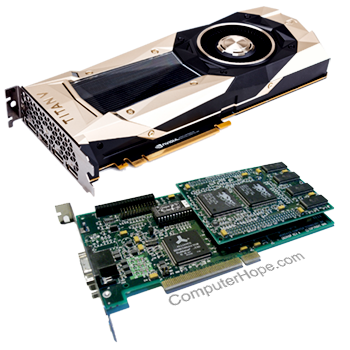
Video card basics
- What is a video card?
- Dictionary definition and related links on the video card.
- Computer bus help and support.
- How do I know which computer video card I have?
- Contact information for computer video card manufacturers.
- Help and buying tips for purchasing a video card.
Top video card questions and answers
- My video card isn't working.
- How to fix "no input signal" error message.
- Does my computer have onboard (integrated) graphics?
- How much memory does my video card have?
Monitor questions and answers
- What is a monitor?
- How to view or change the screen resolution of a monitor.
- Monitor, LCD, and display help and support.
Driver related questions
- What is a driver?
- How do I locate software or drivers for my computer?
- How do I install the latest video drivers on my computer?
- How to install and update a computer driver.
- Computer video card drivers.
Video card questions and answers
- How to install a computer video card.
- How to disable a video card.
- Why does my monitor shift when changing the resolution?
- How to fix distorted video after increasing resolution in Windows.
- Lost video after upgrading to new version of Windows.
- How to flip or rotate a computer monitor display.
- What's the difference between 16-bit, 24-bit, and 32-bit color?
- Why is my laptop using Intel and not AMD video card drivers?
- Why are there black borders on the side of the screen?
- How do I find the BIOS version of my video card?
- How do I remove a computer video card?
- How to tell the temperature of a video card.
- How to replace a video card (GPU) fan.
- Can I upgrade the video memory on my video card?
- How to convert DVI to VGA or VGA to DVI.
- How to reduce the Windows font size if it's too big.
- How to fix 2464 configuration error at boot.
- Where to get OpenGL drivers?
- Why am I unable to increase the resolution in Windows?
- How to enable or disable NVIDIA SLI mode.
- Input signal out of range error.
- When watching videos fullscreen my computer stutters.
- Can't add video card to a computer with onboard video.
- How to fix Windows multiple display issues.
- What is Video Palette Snooping?
- How do I determine the AGP version?
- How do I determine the PCI version?
- Is it possible to have two or more video cards in one computer?
- Why can I only hear and not see a video I downloaded?
- How to fix Windows fonts that are poor quality and not smooth.
- How to fix a black and white picture with laptop connected to TV.
- How do I find the BIOS version of my video card?
- How to have multiple monitors or displays on a computer.
- How to fix video only running at 16 colors in Windows NT 4.0.
- How to split one large display into two or more.
- Which version of Windows 95 supports AGP?
- Changing the resolution or adapter in Windows 3.x.
- How to change and view video settings in MS-DOS.
- Microsoft DirectX help and support.