
How to change a device's resource
If you encounter issues such as an IRQ (interrupt request) conflict or other conflicts with your hardware devices, it may be required you change the resource values on those devices. The below information describes how to change the resource settings for hardware devices on a Windows computer.
- Open the Device Manager.
- Double-click the device to open the devices properties.
- Click the Resources tab.
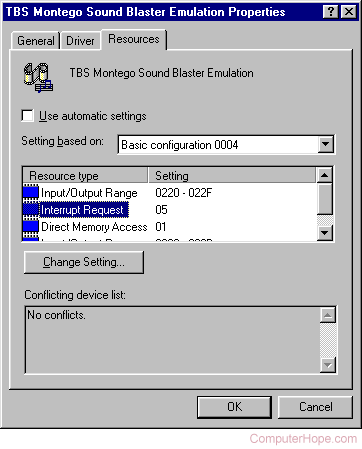
- Uncheck the "Use automatic settings" option (this may vary depending on the version of Windows you are running, however, it will be similar).
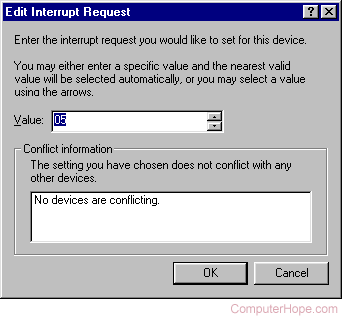
- Either change the Settings based on or double-click the Resource type you want to change. The following is an example when double-clicking the Interrupt Request option.
Error: "You cannot modify the resources for this device directly"
You may receive the error message, "You cannot modify the resources for this device directly. To change the device's resources, change the resources of its parent device."
When receiving this message, directly following it should be its parent device. Opening the parent device and changing its resources allow you to appropriately change the resources.
If you cannot change the resources on your device
Verify you cannot change the device resources by double-clicking the Resource type, and attempting to change the Settings based on option.
If you cannot change the resources for the device when trying both options, you may be encountering one of the following issues.
- The device is a legacy device and requires that jumpers be moved to set the resources.
- The device is an onboard device, soldered onto the motherboard or riser board and have a set resource.
- The device has no other available options to be changed.