
How to open Windows Device Manager
Below are the steps for entering the Device Manager in each of the major versions of Windows. Select a link below for the version of Windows on your computer and follow the instructions.
Press the shortcut key Windows key and Pause at the same time to open the Device Manager.
How to open the Device Manager in Windows 10 and 11
- Press the Windows key+X or right-click Start to open the Power User Menu.
- Select Device Manager in the menu. In Device Manager, you see something similar to the example below.
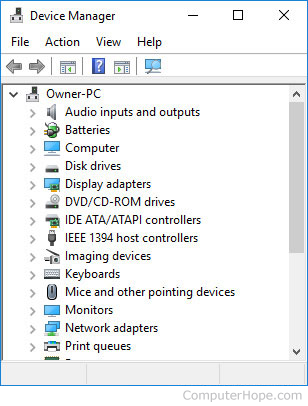
In the Windows search box, you can type device manager and click Device Manager in the search results to open the Device Manager.
Once in the Device Manager, you can start identifying problems in Windows Device Manager.
How to open the Device Manager in Windows 8
- Access the Windows Start screen.
- Type device manager and press Enter.
OR
- Access the Windows desktop.
- Press Windows key+C on the keyboard to open the Charms menu.
- Click Settings, then click the Device Manager icon. In Device Manager, you see something similar to the example below.
In Windows 8.1, you can also access the Device Manager by pressing Windows key+X to open the Power User Tasks Menu. In the menu that opens, select Device Manager.
Once in the Device Manager, you can start identifying problems in Windows Device Manager.
How to open the Device Manager in Windows Vista and 7
- Click Start.
- In the Start menu search box, type device manager and press Enter. In Device Manager, you'll see something similar to the example below.
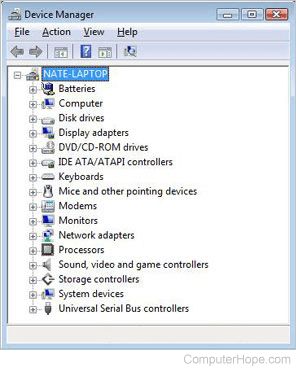
Once in the Device Manager, you can start identifying problems in Windows Device Manager.
How to open the Device Manager in Windows 2003
- Open the Administrative Tools from the Control Panel.
- In the Administrative Tools, click Computer Management.
Once in the Device Manager, you can start identifying problems in Windows Device Manager.
How to open the Device Manager in Microsoft Windows XP and 2000
- On the desktop or in the Start menu, right-click My Computer, and select Properties.
- In the System Properties window, click the Hardware tab.
- On the Hardware tab, click the Device Manager button.
OR
- Open the Control Panel.
- In the Control Panel, double-click the Systems icon.
- In the System Properties window, click the Hardware tab.
- On the Hardware tab, click the Device Manager button and you see something similar to the example below.
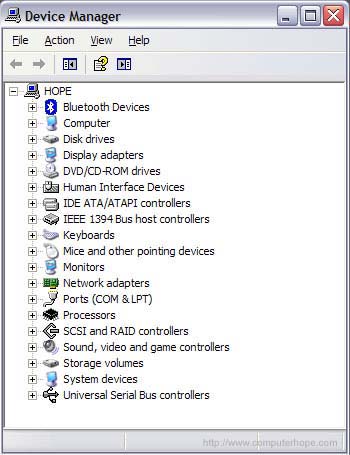
Once in the Device Manager, you can start identifying problems in Windows Device Manager.
Open the Device Manager in Windows 95, 98, 98 SE, and Me
- On the desktop, right-click My Computer and select Properties.
- Click the Device Manager tab.
OR
- Open the Control Panel.
- In the Control Panel, double-click the Systems icon.
- Click the Device Manager tab and you see something similar to the example below.
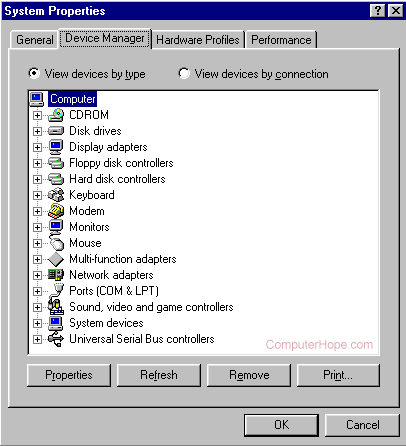
Once in the Device Manager, you can start identifying problems in Windows Device Manager.
Microsoft Windows NT 3.x and Windows 3.x users
These versions of Windows do not have a Device Manager feature.