
How to fix a CMOS checksum error
If you encounter a CMOS checksum error on your computer, the following steps may help you fix the problem.
Bad or old CMOS battery
Reboot the computer. If the error still occurs after rebooting the computer, enter CMOS setup and check all values. Also, verify the date and time are correct. Once everything is verified and changed, make sure you save settings and then exit the CMOS setup.
If everything appears to be correct, try resetting the CMOS to the default values. After the CMOS values are reset, save changes, and exit the BIOS to reboot the system.
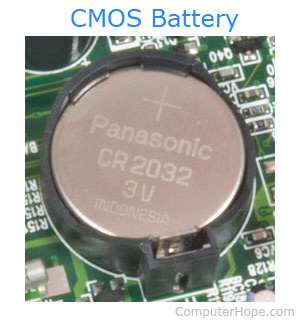
If the issue continues to occur after you turn off your computer, the CMOS battery may be failing or already bad. Before replacing the CMOS battery, try leaving your computer on for several days, sometimes leaving the computer on can re-charge the battery.
Computer improperly turned off
If the computer lost power while it was still running, it may have corrupted the CMOS. Make sure the computer is ready to be shut off before turning off the computer. If you have a laptop computer, make sure the battery is charged before disconnecting the power connection.
If the CMOS values are corrupt, enter the correct values in CMOS setup, and then save and exit the CMOS setup to resolve your issues.
BIOS update recently performed
If a BIOS update was run on the computer, the values stored in CMOS are reset. Enter CMOS setup, re-enter all values, and then save and exit the CMOS setup.
If you cannot enter the CMOS setup, or the computer no longer keeps its BIOS values, the BIOS update may be corrupt. In this case, we recommend updating the BIOS again or reverting to an earlier version.