
BIOS
BIOS may refer to any of the following:
1. Short for Basic Input/Output System, the BIOS (pronounced bye-oss) is a ROM (read-only memory) chip found on motherboards that lets you access and set up your computer system at the most basic level. The picture below is an example of what a BIOS chip may look like on a computer motherboard. The BIOS pictured is of an early AMIBIOS, a type of BIOS manufactured by AMI.
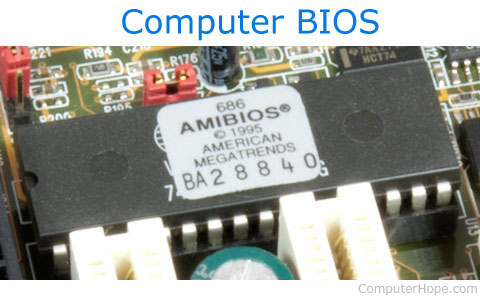
What is included in a BIOS?
The BIOS includes instructions on how to load basic computer hardware. It includes a test known as a POST (power-on self-test) that helps verify the computer meets the requirements to boot up properly. If the computer does not pass the POST, you hear a combination of beeps indicating what is malfunctioning in the computer.
What are the four main functions of a PC BIOS?
- POST - Test the computer hardware and make sure no errors exist before loading the operating system. Additional information on the POST is available on our POST and beep codes page.
- Bootstrap Loader - Locate the operating system. If a capable operating system is located, the BIOS will pass control to it.
- BIOS drivers - Low-level drivers that give the computer basic operational control over your computer's hardware.
- BIOS setup or CMOS setup - Configuration program that lets you configure hardware settings, including system settings, such as date, time, and computer passwords.
Can a BIOS chip be upgraded or updated?
Adding additional memory to a BIOS chip as an upgrade can only be done by replacing the existing BIOS chip with a new, more advanced BIOS chip.
The data on a BIOS chip can be updated if it's a flash BIOS. Using specially designed software, the BIOS can be updated to fix problems or add new features for the motherboard.
What is the BIOS of my computer?
To determine the type or version of BIOS on your computer, you must access the BIOS setup. On the main BIOS screen, it should display the BIOS type (e.g., AMI, Award, or Phoenix) and the version of the BIOS.
What was the first BIOS?
The first BIOS was developed by Gary Kildall and included in the CP/M operating system in 1974. Kildall coined the term "BIOS" to describe a part of a machine that loads at boot-up and communicates with other computer hardware.
2. When describing more than one person's BIO, BIO's is short for biography and describes a brief description of a person. A short biography or description of people who have affected the computer industry is on our computer people page.
ACPI, BBS, BIO, BIOS shadow, BPB, CMOS, Computer acronyms, EFI, Firmware, Flash BIOS, FWH, Hardware terms, Libreboot, Motherboard terms, NVRAM, PROM, UEFI