
How to cast a website or Windows desktop to a TV
Updated: 11/30/2020 by Computer Hope
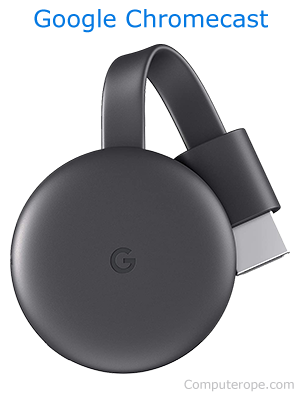
A Chromecast is a handy device that allows users to broadcast various streaming content from their mobile devices to a TV. However, many users don't know that they can view a website or Windows desktop using a PC too.
Cast to your TV using your web browser to view anything you see in the browser window or anything you're doing in Windows on your television.
Note
As of March 2024, only the Google Chrome and Microsoft Edge browsers support the Cast feature.
Google Chrome

To cast your screen to a Chromecast using Google Chrome, follow these steps.
- Before you begin, make sure the Chromecast and your TV are both turned on.
- Open Google Chrome.
- Click the
 icon in the upper-right corner of the Chrome browser window.
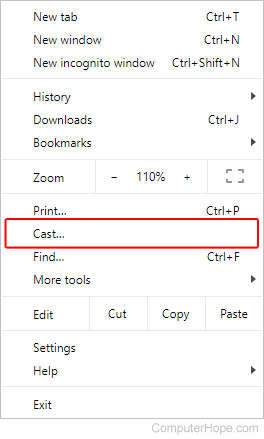
 - Select Cast from the menu.
- Select your device from the prompt.
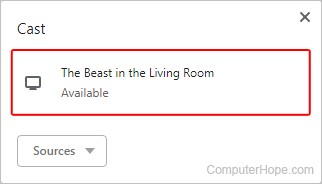
- Your Chromecast displays your browser window on your TV.
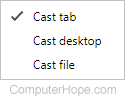
- If you click the Sources button, you may choose to cast your desktop or a file stored on your computer, in addition to a browser window.
Microsoft Edge Legacy

To cast your screen to a Chromecast using Microsoft Edge Legacy, follow these steps.
- Before you begin, make sure the Chromecast and your TV are both turned on.
- Open the Microsoft Edge Legacy browser.
- In the upper-right corner of the Edge Legacy browser window, click the
 button.
 - Select More tools from the menu.
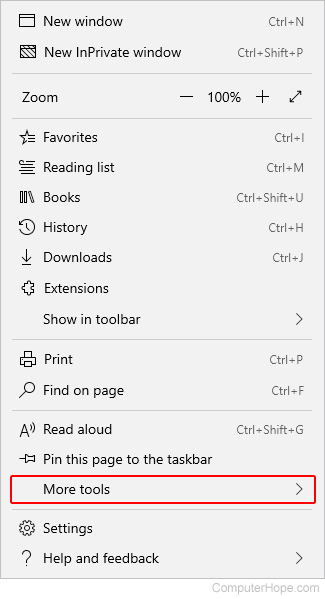
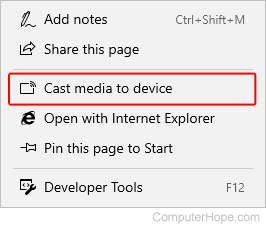
- Select the Cast to media device option.
- Locate your device in the upper-right corner of the screen.
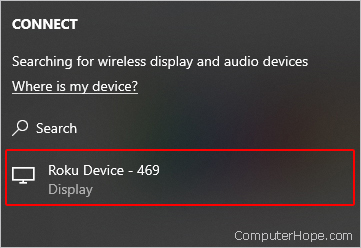
- Select a device to cast your browser to your TV.