
How to remove the extra symbols in Microsoft Word
The "Show All" feature in Microsoft Word lets you see each of the formatting mark tags, such as spaces, carriage returns or new lines, tabs, and new paragraphs in Microsoft Word.
You cannot delete the formatting marks. They can only be hidden by disabling the Show All feature.
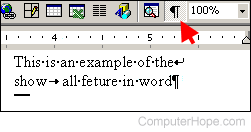
The image above shows the pilcrow icon, which enables and disables this feature (looks like a backwards 'P'). The image also displays example text with the main formatting symbols. To enable or disable this feature, click the Show All, or pilcrow, icon on the standard toolbar. If this toolbar is not visible, click View, Toolbars, and select Standard.
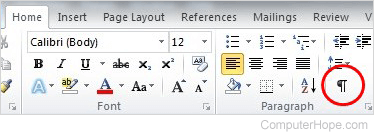
In Microsoft Word 2007 and later, the Show All icon is on the Home tab, in the Paragraph section.
If some symbols are not being hidden when disabling the Show All feature, those symbols are not formatting marks and must be removed manually.