
Missing Windows desktop Recycle Bin icon
Updated: 12/05/2021 by Computer Hope
If you are missing the Windows Recycle Bin icon on the desktop and want to restore it, follow the steps below.
Note
If your desktop has no icons, it may be set to hide all icons on the desktop. Before following the steps below, make sure your desktop is showing icons. See: How to show or hide desktop shortcut icons.
Show the Recycle Bin icon in Windows 11
- Right-click the desktop and select Personalize in the pop-up menu.
- On the right side of the Personalization window, click the Themes option.
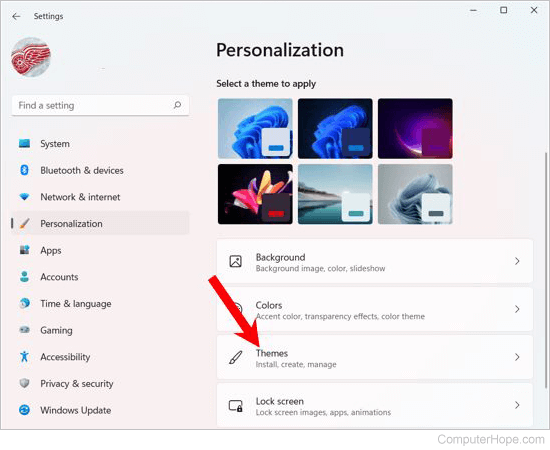
- Scroll down to the Related Settings section and click the Desktop icon settings option.
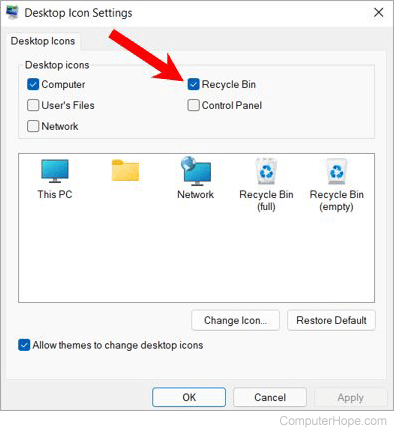
- In the Desktop Icon Settings window, check the box for Recycle Bin to enable the Recycle Bin icon.
or
- Click Start or press the Windows key.
- Type Themes and press Enter or select the Themes and related settings entry in the search results.
- Scroll down to the Related Settings section and click the Desktop icon settings option.
- In the Desktop Icon Settings window, check the Recycle Bin box to enable the Recycle Bin icon.
Show the Recycle Bin icon in Windows 10
- Right-click the desktop.
- In the pop-up menu, select Personalize.
- In the left navigation menu, click the Themes option.
Note
If you do not see the Themes option on the left side of the window, resize it to make sure it's big enough to show all options. See: How to resize a window.
- Scroll down to the Related Settings section and click the Desktop icon settings option.
- In the Desktop Icon Settings window, check the Recycle Bin box to enable the Recycle Bin icon.
or
- Click Start or press the Windows key.
- Type Themes and press Enter or select the Themes and related settings entry in the search results.
- Scroll down to the Related Settings section and click the Desktop icon settings option.
- In the Desktop Icon Settings window, check the Recycle Bin box to enable the Recycle Bin icon.
Show the Recycling Bin in Windows 8 and Windows 8.1
- Right-click the desktop.
- Click Personalize.
- Click Themes.
- Click Desktop icon settings.
- In the Desktop Icon Settings window, check the Recycle Bin box to enable the Recycle Bin icon.
Showing the Recycling Bin in Windows Vista and Windows 7
- Right-click the desktop.
- Click Personalize.
- In the Personalize appearance and sounds window, click the Change desktop icons link on the left side.
- Check the box next to Recycle Bin.
- Click Apply, then click OK.
Microsoft Windows XP
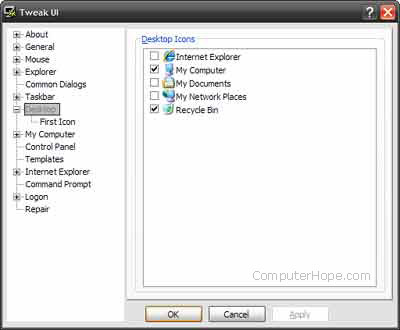
If your computer is running Windows XP, follow these steps.
- Download and install Windows TweakUI.
- Open TweakUI and click Desktop, as shown in the picture.
- In the Desktop section, check the box next to Recycle Bin.
- Click Apply, then OK.