
Artifacts
Updated: 11/16/2019 by Computer Hope
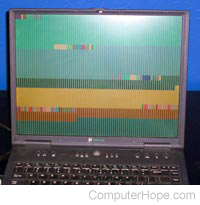
With computers and electronics, artifacts, commonly known as digital artifacts, are errors that occur during signal transmission or interpretation. Artifacts can be encountered with a digital camera picture, during the transmission of a digital file, and artifacts created from a signal or data compression. The picture shows a crashed laptop with digital artifacts.
What to do when getting artifacts?
Below are some general suggestions for troubleshooting artifact-related issues.
- Check connections. Disconnect and re-connections to ensure firmly connected.
- Artifacts in a video game and often caused by video card driver issues or a video card is getting too hot. Make sure your game is running the latest version and that the video card driver is up-to-date.
- If your computer monitor is always displaying artifacts, regardless of what program you use, try a different monitor on the computer. If the same issue persists, make sure you've got the latest video drivers and that the video card is firmly connected into the computer.
- If your digital camera is generating artifacts in pictures, make sure your quality is set to the highest available option. If settings are set to their highest quality, and pictures still have artifacts, it's likely a digital camera limitation or issue with the camera.
- If you're getting artifacts when compressing or changing a video from one format to another, try a different format.
- If you're getting artifacts on your TV display and have cable or a satellite connection, make sure you're getting a strong signal. Often it's best to contact your provider to verify your connection is good and strong.