
Formula bar
Alternatively called a formula box, the formula bar is a section in Microsoft Excel and other spreadsheet applications. It shows the contents of the current cell and lets you create and view formulas. The two pictures below are examples of what the formula bar looks like in Microsoft Excel. To start creating a formula, click the mouse cursor in the formula bar and enter an equal sign (=). In both of the examples below, we're using the =SUM, which tells Excel to add each of the cells.

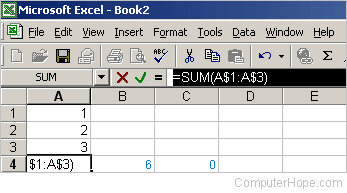
Where is the formula bar located in Microsoft Excel?
In spreadsheet applications, such as Microsoft Excel, the formula bar is located directly above the spreadsheet, as labeled in the picture below.
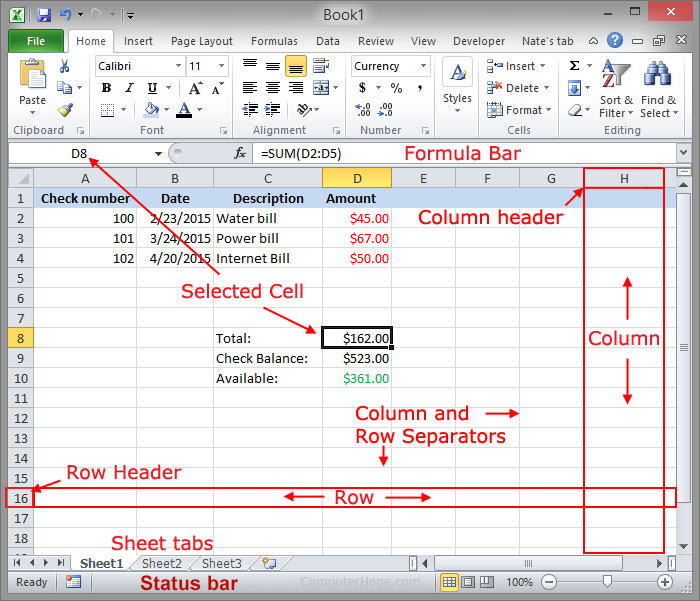
Above, the formula bar has a cell content of "=SUM(D2:D5)" that adds values in rows 2, 3, 4, and 5 in the D column. In this spreadsheet, the result is $162.00. Cell D5 is empty, and treated as zero.
Use the keyboard shortcut Ctrl+Shift+U to expand and collapse the formula bar.
How to hide and show the formula bar
The Excel formula toolbar can be hidden and shown by following the steps below.
- In Excel, click View.
- In the Show section check "Formula Bar" box to show the formula bar and uncheck the box to hide the formula bar.