Computer Hope

Other Pages

Home
Site map
Computer help

Dictionary
News
Q&A
What's new

Tools

E-mail this page
Print Preview
Edit this page


Computer Hardware
Information about computer Power Supplies

Quick links

Power supply ABCs
Power supply form factors
Power management
Power supply connections
Checking voltage levels
Power supply connector
Technical support
Power
definitions

POWER SUPPLY ABCs

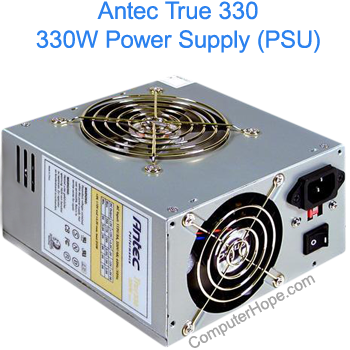
Supplies power throughout the computer. Power supplies convert potentially lethal 110-115 or 220-230 volt alternating current (AC) into a steady low-voltage direct current (DC) usable by the computer. A power supply is rated by the number of watts it generates.

WARNING: Do not open the power supply, it contains capacitors which can hold Electricity (WHICH CAN KILL) even if the computer is power off for a week, if not longer. If you do open it, WHICH IS NOT RECOMMENDED, take all precautions and ensure you work with one arm behind your back to direct the electricity away from the heart. Also ensure that you have no jewelry on (such as a watch or rings). However, again, THIS IS NOT RECOMMENDED, and still cannot protect you 100% and is still potentially dangerous. Because of these precautions, no extensive information will be found on this page about opening power supplies.

POWER SUPPLY FORM FACTORS

Currently in the industry there are eight power supply form factors. Each of these form factors can have various amounts of configurations and power output levels.

PC / XT
AT/Desk
AT/Tower
Baby AT
LPX
ATX
NLX
SFX

POWER MANAGEMENT

Power management was designed for convenience as it easier to have your computer go into power standby and be able to press a key on your keyboard or move your mouse and instantaneously be back where you were and for saving power. This is especially important on portable computers when using the battery as your main power source.

POWER SUPPLY CONNECTOR

The below illustration is the typical female connector which would be used to connect to a device such as a CD-ROM or Hard Drive. This connector is refereed to as a large Molex connector. Additional to these types of connectors you may also find a small Molex which is generally used for the floppy disk drive.

Pin Wire Color Signal
1 Yellow +12v
2 Black Ground
3 Black Ground
4 Red +5v

Index

Category:
Hardware

Companies:
Click here

Related Pages:

Drivers

No specific drivers for this topic.

See Drivers Page for complete listing of drivers.

Resolved

Were you able to locate the answer to your questions?
POWER SUPPLY CONNECTIONS
Pin Number

Color

Function

Connector

1 Orange "Power Good" P8
2 Red (XT No Wire) +5V DC P8
3 Yellow +12V DC P8
4 Blue -12V DC P8
5 Black Ground P8
6 Black Ground P8
7 Black Ground P9
8 Black Ground P9
9 Black Ground P9
10 Yellow -5V DC P9
11 Red +5V DC P9
12 Red +5V DC P9


TECHNICAL SUPPORT

Reference

Issue / Question
CHADD Additional information with installing computer hardware.
FORUM If your question is not listed on this page please try our online forum.
CH000302 Noise from computer.
CH000310 Computer does not turn off.
CH000311 Fan is not spinning in the power supply.
CH000312 No power or computer does not turn on.
CH000313 What should my power supply be set to?
CH000314 How much power do devices take?
CH000390 Is it better to leave the computer on or turn it off?
CH000422 Installing a PC computer power supply.
CH000585 Additional information about power in different countries.
CH000800 How do I determine how big my power supply is?
CH000802 My computer and/or computer plug is sparking or smoking.
CH000844 I have a bad power supply should I repair it or replace it?
CH000903 Will a power supply work without being connected to the Motherboard?
CH000999 Is it ok for a laptop to go into standby or hibernate instead of turning it off?
CH001000 How do I disable hibernation mode in Windows?


Home - Computer help - Contact - Dictionary - Links
Link to Computer Hope - Bookmark Computer Hope